I want to start this article differently because I wish someone had told me this when I started.
“If you can’t afford a webcam yet, don’t buy a terrible one just so you can say you have one!”
Start without it.
- People can still watch your gameplay
- You can still talk to chat
- You can still start building a community
- You can still make content
- Then make the webcam part of the journey
That’s actually how I bought my Elgato Stream Deck.
I told everyone watching that I was saving up for one and that any gifts I received on stream were going toward it.
Before I knew it, I had my Stream Deck.
There’s no reason a new streamer couldn’t do the same thing with a webcam.
“We’re saving for the webcam.”
Now it’s something your community gets to be part of.
I’d rather see someone do that for a few weeks than spend $25 on a webcam that makes them look like they’re streaming from a gas station security camera.
Some links in this article may be affiliate links, meaning I may earn a commission at no additional cost to you. Thanks for supporting ChannlerG!

TL;DR
If you’re just getting started, I think $100–$150 is a perfectly reasonable maximum budget for your first webcam.
You can absolutely spend less, though.
My picks:
- Best Overall: OBSBOT Meet 2
- Best Cheap Webcam: Logitech C920s
- Best Cheap Upgrade: Anker PowerConf C200
- Best for New Streamers: Elgato Facecam Neo
- Best for Smooth Video: Logitech C922
- Best Step-Up Option: Logitech Brio 500
- Best $0 Option: Don’t use a webcam yet
And yes, I’m serious about the last one.
My First Webcam Was Probably More Than I Needed
My first, and still current, webcam is the OBSBOT Tiny 2 Lite
I love it.
I’ve put roughly 300 hours of streaming through it, and it has been incredibly reliable.
But I bought it when I didn’t really know what I needed.
I saw:
- 4K (That sounded important)
- AI tracking (Obviously I needed that)
- OBSBOT (I genuinely thought OBSBOT was somehow part of OBS)
It’s not.
I assumed that meant it would integrate better with OBS than everything else.
Again…not a thing.
It does integrate beautifully with my setup, and I’ve had a great experience with it. I just didn’t understand any of this when I bought it.
More than a year later, I barely use the tracking and normally stream my webcam at 1080p/60.
That’s why I’d shop differently if I were starting today.
Check out Do You Really Need a 4K Webcam to Stream?
Best Overall: OBSBOT Meet 2
If I were starting fresh and wanted something around my ideal budget, the OBSBOT Meet 2 would be high on my list.
Current listings put it around $129, and you’re getting 4K/30, 1080p/60, autofocus, and a 1/2-inch sensor.
Ironically, I’m recommending an OBSBOT again.
Not because I’m “Team OBSBOT.”
I’ve just had a really good experience with the brand, and the Meet 2 gives you a lot without making the jump into much more expensive creator cameras.
Why I’d Consider It
- 1080p/60 for streaming
- 4K available when you actually want it
- Autofocus
- Compact
- Falls right around what I’d personally spend
Affiliate Link: Check current price on Amazon
Best Cheap Webcam: Logitech C920s
This thing refuses to die.
The C920 family has been recommended for what feels like forever, and it’s still appearing in 2026 budget-webcam recommendations. TechRadar currently names the C920s its best cheap webcam overall.
There’s a reason for that.
It isn’t trying to impress you with an insane spec sheet.
It’s just a proven 1080p webcam with autofocus that gets the job done.
Why I’d Consider It
- Established reputation
- 1080p
- Autofocus
- Simple
- Plenty for a small stream facecam
If you’re thinking:
“I just need something reliable.”
This is exactly the kind of camera I’d look at.
Affiliate Link: Check current price on Amazon
Best Cheap Upgrade: Anker PowerConf C200
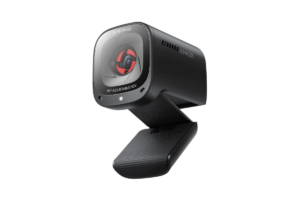
This one surprised me while researching the current options.
The PowerConf C200 gives you a 2K image, adjustable field of view, low-light correction and a built-in privacy cover without moving into expensive webcam territory. It’s also showing up repeatedly among current budget recommendations.
That’s a really interesting middle ground.
You’re spending more than the rock-bottom Amazon cameras, but you’re not paying for a bunch of creator features you may never touch.
Why I’d Consider It
- 2K resolution
- Strong value
- Low-light correction
- Simple feature set
This is the kind of product I mean when I say budget doesn’t have to mean cheap.
Affiliate Link: Check current price on Amazon
Best for New Streamers: Elgato Facecam Neo
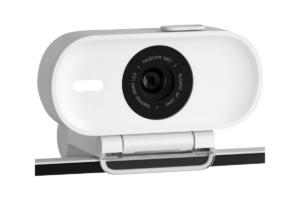
This is probably one of the most interesting options for someone specifically starting a stream.
PC Gamer currently recommends the Facecam Neo as its best budget webcam, noting its 1080p/60 support and HDR.
And 1080p/60 is exactly where I’d personally be looking.
You don’t need to obsess over 4K.
You don’t need AI to follow you around the room.
You need a clean picture that works reliably when you go live.
One caveat: it uses fixed focus rather than autofocus. That may actually be perfectly fine if you’re sitting at your desk in roughly the same spot every stream, but it’s something I’d want to know before buying.
Why I’d Consider It
- 1080p/60
- Made with creators in mind
- Straightforward
- Doesn’t waste money chasing 4K
Affiliate Link: Check current price on Amazon
Best for Smooth Video: Logitech C922
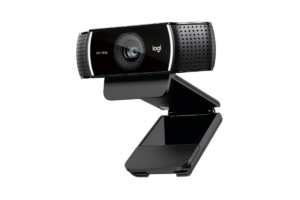
Another Logitech?
Yep.
The C922 remains a popular streaming option because it offers 1080p video while also supporting 60 fps at 720p. Current 2026 testing still praises its low-light performance and versatility for streaming.
I wouldn’t buy it just because “streaming” is written somewhere on the box.
I’d buy it if the current Amazon price makes sense compared with the C920s and newer options.
That’s important with older hardware.
Check the price.
Sometimes an older favorite is an incredible deal.
Sometimes newer hardware costs almost the same.
Why I’d Consider It
- Long track record
- Streaming-focused
- Autofocus
- 60 fps option
Affiliate Link: Check current price on Amazon
Best Step-Up Option: Logitech Brio 500
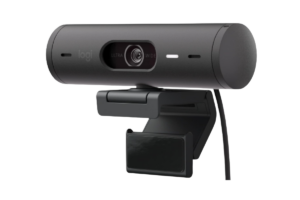
This is where I’d start asking:
Am I still buying a budget webcam, or am I starting to spend enough that I should compare better cameras?
That’s not necessarily a bad thing.
The Brio 500 offers 1080p, auto light correction, autofocus/auto-framing features and a physical privacy shutter.
If you want something from an established brand that can pull double duty for streaming, work, school and everyday video calls, it makes sense.
Why I’d Consider It
- Versatile
- Strong brand reputation
- Better lighting features
- Useful outside of streaming
Once the price starts getting around $120+, though, I’d compare it directly with cameras like the OBSBOT Meet 2 before ordering.
That’s where the competition gets much more interesting.
Affiliate Link: Check current price on Amazon
Best $0 Option: No Webcam
I’m putting this on the list because I mean it.
If buying a webcam means you can’t afford the game you want to stream…
Don’t buy one yet.
If it means putting something on a credit card…
Don’t buy one yet.
If all you can afford is the cheapest no-name webcam you can find…
I’d seriously consider waiting.
Your personality matters more than your facecam.
Go live.
Talk.
Make people laugh.
Build the community.
Put a webcam goal on the stream if you want.
Then buy something you’ll actually be happy with.
There is absolutely nothing wrong with starting webcam-free.
Want my camera? Check out my Obsbot Tiny 2 Lite Review (After Over A Year of Streaming)
Please Buy a Light Too
This might be the most important part of the entire article.
A webcam needs light.
Even an expensive camera can’t magically create light that isn’t there.
My own setup improved dramatically once I started paying attention to lighting.
You don’t need a professional studio.
A basic ring light pointed at your face can make an enormous difference.
Then, later, you can start worrying about background lighting, RGB and making the room look cool.
Front lighting first.
Spaceship later.
I put together a Best RGB Lights for Gaming Setups guide
What I’d Buy
If I had around $120 to spend on the webcam alone, I’d start by comparing the OBSBOT Meet 2 against whatever Logitech and Elgato options were currently priced closest to it.
If my entire camera-and-lighting budget was $120, I’d drop down to something like the C920s or PowerConf C200 and buy a ring light.
That’s a much better setup in my opinion.
And if I had $0?
I’d start streaming anyway.
You can upgrade later.