
My current mouse isn’t impressive.
It’s a Logitech M510 that cost me around $28, and I’ve used it for more than two years.
It’s mostly a work mouse. I wouldn’t recommend somebody buy it specifically for gaming, and I’m pretty confident I’d immediately notice the difference if I upgraded to an actual modern gaming mouse.
But it has taught me one thing:
I don’t want another cable on my desk.
I’ve already got enough going on.
- Two monitors
- Keyboard
- Microphone
- IEMs
- Stream Deck
- Chargers
- PC cables
- Everything involved with streaming
Why am I adding another wire if I don’t have to?
Some links in this article may be affiliate links, meaning I may earn a commission at no additional cost to you. Recommendations outside my own gear are based on current specs, independent testing, value, and what I’d actually consider buying.

TL;DR
I don’t see myself going back to a wired mouse.
It’s 2026, I’m not a pro gamer, and my desk is cluttered enough as is.
So if you’re ready to get another cable off your desk, these are the wireless mice I’d look at:
- Best Overall: Razer Viper V4 Pro
- Best Budget: Logitech G305 LIGHTSPEED
- Best Under $50: SteelSeries Rival 3 Wireless Gen 2
- Best for FPS: Logitech G PRO X2 SUPERSTRIKE
- Best All-Around: Logitech G502 X LIGHTSPEED
- Best Compact: Keychron M3 Mini
- Best RGB: SteelSeries Aerox 3 Wireless Gen 2
- Best Mid-Range Performance: MCHOSE L7 Ultra+
- Best with a Charging Dock: MSI Versa Pro Wireless + Mouse Dock Pro
- Best Gaming + Productivity: Logitech G502 X PLUS
If you aren’t sold on wireless, I recently put together 10 Best Gaming Mice in 2026 for Every Type of Gamer, which includes both wired and wireless options.
This article is for those of us who’ve already decided:
Get the cable off my desk.

Best Overall: Razer Viper V4 Pro
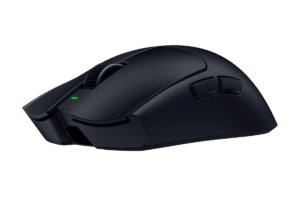
I’m keeping one of our recommendations from the overall gaming-mouse guide right at the top.
That’s intentional.
The Razer Viper V4 Pro is still one of the strongest wireless gaming mice available, and changing the winner just because I wrote another article would make no sense.
It weighs around 49 grams and supports wireless polling rates up to 8,000Hz. Current independent testing gives it excellent marks for raw performance, responsiveness and its relatively accommodating shape.
This is basically what happens when the old argument of “wireless mice aren’t fast enough” stops being particularly convincing.
Why It Made My List
- Extremely responsive wireless performance
- Very lightweight
- Up to 8,000Hz polling
- Excellent sensor performance
- Shape works for a wide range of gamers
- High-end performance without a cable
Who I’d Buy It For
Someone who wants an excellent wireless gaming mouse and doesn’t mind paying for performance.
If you’re mostly casually gaming?
You definitely don’t need to start here.
Get it here: Check the Razer Viper V4 Pro on Amazon
Best Budget: Logitech G305 LIGHTSPEED

I’m keeping this one too.
The Logitech G305 LIGHTSPEED isn’t exciting.
That’s part of why I like it.
It’s an affordable wireless gaming mouse that’s been around long enough to establish a pretty good reputation, and you don’t need to spend $100+ just to get decent wireless gaming performance.
It also runs on an AA battery rather than constantly needing to go back on a charger.
- Put a battery in it
- Use the thing
- Stop thinking about it
Why It Made My List
- Affordable
- Proven wireless design
- Long battery life
- Solid gaming performance
- Simple
- Easy entry into wireless gaming mice
It’s heavier than the super-light competitive mice that dominate the high end now.
For someone just looking for a good, inexpensive wireless mouse?
That’s completely fine.
Find it here: Check the Logitech G305 LIGHTSPEED on Amazon
Best Under $50: SteelSeries Rival 3 Wireless Gen 2
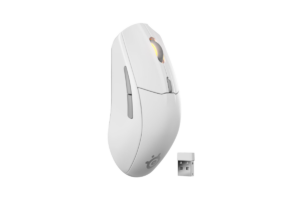
The SteelSeries Rival 3 Wireless Gen 2 is much more interesting to me for this category than using another mouse we’d already recommended.
It’s the updated wireless version of SteelSeries‘ affordable Rival 3, and independent testing found excellent build quality, very low click latency and strong sensor performance. It can connect through its 2.4GHz receiver or Bluetooth and uses replaceable batteries.
The big tradeoff is weight.
It’s noticeably heavier than a lot of the newer competitive FPS mice.
But again:
We’re talking about the under-$50 category.
I’m not expecting the absolute best mouse in existence.
I’m looking for something I’d actually feel comfortable recommending to someone who doesn’t want to spend much.
Why It Made My List
- Affordable
- Strong gaming performance for the price
- Excellent build quality
- 2.4GHz wireless + Bluetooth
- Comfortable symmetrical shape
- Replaceable batteries
Who I’d Buy It For
Someone who wants a proper wireless gaming mouse without immediately spending $80–$150.
That’s probably a much bigger group of people than the internet sometimes makes it seem.
Get it here: Check the SteelSeries Rival 3 Wireless Gen 2 on Amazon
Best Wireless Mouse for FPS: Logitech G PRO X2 SUPERSTRIKE
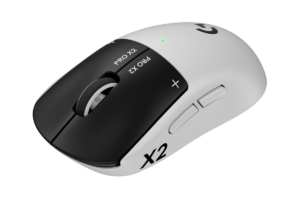
The Logitech G PRO X2 SUPERSTRIKE is for someone who actually cares about squeezing as much competitive performance as possible out of a wireless mouse.
- Extremely low latency
- Lightweight construction
- High polling rates
- Competitive-focused design
This is serious enthusiast territory.
Why It Made My List
- Extremely low latency
- Built around competitive gaming
- High-end wireless performance
- Lightweight
- Up to 8,000Hz polling
Would this make me dramatically better at shooters?
No.
If you’re waiting for your mouse to turn you into a professional FPS player, I have bad news.
But if you’re already playing competitively and want equipment designed around that use?
Now spending more starts making sense.
If you’re building out the rest of that setup too, this is where I’d naturally point you toward Best Monitors for FPS Games in 2026 rather than spending your entire budget on a mouse.
Find it here: Check the Logitech G PRO X2 SUPERSTRIKE on Amazon
Best All-Around: Logitech G502 X LIGHTSPEED
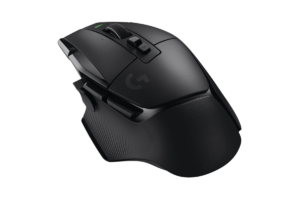
The G502 X LIGHTSPEED makes more sense for someone who plays different kinds of games and uses the same computer for other things.
That’s me.
- One day it’s The Finals
- Then LEGO Batman
- Then a story game
- Then I’m working on ChannlerG
I don’t need a mouse engineered to shave tiny amounts of weight off my FPS setup.
Why It Made My List
- Great across different game genres
- Wireless
- Comfortable
- Lots of useful programmable controls
- Useful for everyday PC use
- Doesn’t sacrifice versatility just to become ultra-light
I want something that’s really good at basically everything.
That’s why the G502 X keeps surviving these lists.
Get it here: Check the Logitech G502 X LIGHTSPEED on Amazon
Best Compact Wireless Mouse: Keychron M3 Mini
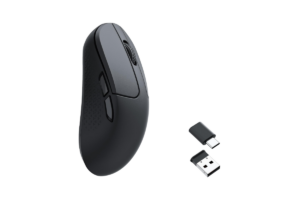
The Keychron M3 Mini is smaller and substantially lighter than the regular M3, weighing around 57 grams in RTINGS‘ testing. Despite its relatively affordable positioning, it uses a high-performance PixArt PAW3395 sensor and is available in both 1,000Hz and 4,000Hz versions.
Compact doesn’t have to mean crappy.
Why It Made My List
- Smaller design
- Around 57 grams
- Strong sensor performance
- Very low click latency
- 4,000Hz version available
- USB-A and USB-C connectivity accessories
- Reasonable price compared with flagship mice
Who I’d Buy It For
Someone with a smaller setup, someone who prefers a smaller mouse, or someone who moves their gaming gear between locations.
It’s also a good reminder that Logitech and Razer aren’t the only companies making gaming mice worth considering.
Find it here: Check the Keychron M3 Mini on Amazon
Best RGB: SteelSeries Aerox 3 Wireless Gen 2
Do you need RGB on your mouse?
Of course not.
Do I understand wanting it anyway?
Absolutely.
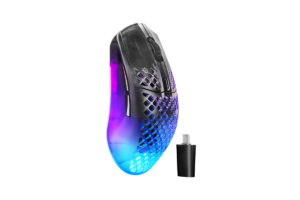
The new SteelSeries Aerox 3 Wireless Gen 2 launched in 2026 as an update to the long-running Aerox 3 Wireless.
And this isn’t just the old mouse with prettier lights.
SteelSeries upgraded the sensor and pushed wireless polling up to 4,000Hz. It also supports both 2.4GHz wireless and Bluetooth.
PC Gamer called the 2026 refresh a worthwhile update, while Tom’s Guide praised its gaming performance, comfort and battery life.
And yes….
It has RGB.
Why It Made My List
- RGB lighting
- 4,000Hz wireless polling
- Lightweight design
- Excellent gaming performance
- Bluetooth + 2.4GHz
- Strong build quality
- Up to 200 hours of advertised battery life depending on connection/settings
The Catch
It still uses the Aerox honeycomb-style shell.
- Some people love that look
- Some people absolutely do not
Personally, I think if you’re intentionally shopping for RGB, you’re probably a little more accepting of your mouse looking like it belongs in a spaceship anyway.
Get it here: Check the SteelSeries Aerox 3 Wireless Gen 2 on Amazon
Best Mid-Range Performance: MCHOSE L7 Ultra+
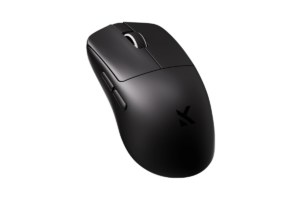
The MCHOSE L7 Pro+ is significantly cheaper than some of the flagship competitive mice but still brings some pretty ridiculous specifications.
Its weight is only about 43 grams, and it uses a PixArt PAW3395 sensor and supports polling rates up to 8,000Hz.
That’s a lot of mouse for the money.
Why It Made My List
- Around 43 grams
- Up to 8,000Hz polling
- PAW3395 sensor
- Strong wireless performance
- Much cheaper than many flagship competitive mice
- Excellent performance-to-price ratio
What’s the Catch?
You’re giving up some of the brand familiarity you get from Logitech, Razer or SteelSeries.
It should also be noted that the rear-heavy shape favors claw grip more than pure palm grip, and the clicks are a little stiffer than ideal.
That’s why I’m not randomly declaring it the best mouse in the article because the spec sheet looks good.
But if you’re comfortable stepping outside the biggest brands?
This is exactly the kind of mid-range option I’d investigate before automatically spending $150+.
Find it here: Check the MCHOSE L7 Ultra+ on Amazon
Best With a Charging Dock: MSI Versa Pro Wireless + Mouse Dock Pro
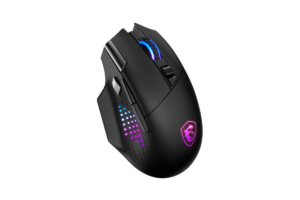
The MSI Versa Pro Wireless comes with a magnetic charging dock, so instead of remembering to plug another cable into your mouse, you can put it back on the dock when you’re done.
That’s something I could get behind.
The Versa Pro has been found to be a versatile wireless mouse with 15 total buttons, 13 of them programmable, a PixArt PAW3395 sensor and up to around 80 hours of battery life with RGB disabled.
The dock can also charge the mouse while you’re using it.
Why It Made My List
- Magnetic charging dock
- Lots of programmable buttons
- PAW3395 sensor
- Useful for gaming and productivity
- Up to around 80 hours without RGB
- Convenient charging setup
The Catch
It’s heavier than the competitive FPS mice, and customers aren’t particularly impressed with MSI Center software.
But I actually like having this category in the article because it solves one of the few genuine annoyances with wireless gear.
I told you I don’t care whether my next mouse uses AA batteries, USB-C or a dock.
Just don’t make me constantly think about charging it.
Putting the mouse on a dock when I’m done?
Easy.
Get it here: Check the MSI Versa Pro Wireless + Mouse Dock Pro on Amazon
Best for Gaming + Productivity: Logitech G502 X PLUS
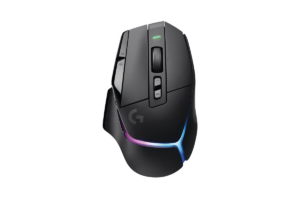
Yes, we’re keeping another G502.
Because if your gaming PC is also your work PC, the G502 X PLUS still makes a lot of sense.
Mine is.
The PLUS keeps the comfortable right-handed shape, programmable controls and versatile scroll wheel that make the G502 useful outside gaming, while adding RGB.
Why It Made My List
- Excellent gaming performance
- Plenty of programmable controls
- Free-scrolling wheel is useful for work
- Comfortable
- Wireless
- RGB
Do you need the PLUS instead of the regular G502 X LIGHTSPEED?
No.
If you don’t care about RGB and the LIGHTSPEED is significantly cheaper, I’d save the money.
That’s probably what I’d personally do.
But for someone building a gaming setup that doubles as a workspace and who actually wants the RGB?
Here you go.
Find it here: Check the Logitech G502 X PLUS on Amazon
What I’d Actually Spend
I don’t need the best wireless mouse in the world.
I’d probably be looking somewhere around $50–$100.
That’s enough to get something substantially better than my M510 without wandering into the territory where I’m paying huge premiums for performance I won’t recognize.
I’d spend an extra $30 for wireless over an otherwise similar wired mouse.
Absolutely.
But that’s because I already know what matters to me.
I hate clutter.
Someone building their first gaming PC with a strict budget might be completely different.
If buying wired lets you get a substantially better mouse for the same money?
Think about it.
Don’t spend money just because I like wireless.
That’s basically the philosophy behind The Best Gaming Setup Isn’t the Most Expensive One.
Figure out what matters to you first.

Do You Need a Wireless Gaming Mouse?
No.
You don’t need a gaming mouse at all.
I’m sitting here using an M510.
You’ll survive.
But if you’re buying a new gaming mouse anyway?
I think wireless is extremely compelling in 2026.
The old assumption that wireless automatically means obviously worse gaming performance doesn’t really fit the hardware we’re looking at anymore.
Now you’ve got:
- Affordable wireless mice
- Competitive wireless mice
- Tiny wireless mice
- RGB wireless mice
- Wireless mice with charging docks
- And $150+ monsters for people who want every possible performance advantage
At that point, the decision becomes much simpler.
Do you want a wire?
I don’t.
- It’s 2026
- I’m not a pro gamer
- And my desk is cluttered enough as is
Which Wireless Gaming Mouse Would I Buy?
I’m still leaning toward the Logitech G502 X LIGHTSPEED.
It’s not the winner of every technical benchmark.
That’s okay.
For the mixture of gaming, website work, and general computer use I actually do, it makes more sense to me than paying extra for a mouse built almost entirely around competitive FPS performance.
But this new list gave me a couple of options I wouldn’t have considered before.
- If I wanted to spend less, the SteelSeries Rival 3 Wireless Gen 2 makes a lot of sense.
- If I wanted something compact, the Keychron M3 Mini is way more capable than I would’ve expected.
- And the MCHOSE L7 Ultra+ is interesting if you’re chasing performance without immediately jumping into flagship pricing.
That’s really what I want these lists to do.
Not tell you:
“This is the best mouse. Buy it.”
Give you enough genuinely different options that you can figure out which one makes sense for the way you actually use your computer.
Buy for the gamer you actually are.
Not the gamer the spec sheet makes you think you’re supposed to be.