I hate overspending.
That’s probably obvious if you’ve read basically any of my other gaming gear articles, but keyboards might be one of the easiest places to do it.
You can spend $150, $200, or even more on a gaming keyboard and get:
- Adjustable switches
- Insanely high polling rates
- Wireless connectivity
- Screens
- Custom keycaps
- & enough settings to keep you busy for an entire afternoon.
Some of that stuff is awesome.
The question is whether you actually need any of it.
- My own gaming keyboard is wired
- It has RGB
- It works
- & I like being able to see the letters when I’m sitting in a dark room
I’ve never sat at my desk thinking my keyboard was holding back my gaming.
That’s the perspective I’m bringing into this list.
I wanted to find the best gaming keyboards you can actually buy for less than $100 without automatically rewarding whichever one has the longest spec sheet.
My priorities were pretty simple:
- Price and value first
- How it feels
- Build quality
- Responsiveness
- RGB
- & Then all the extra stuff
And just like our other budget guides, $100 is a real ceiling. We’re not calling a $140 keyboard “under $100” because it went on sale for three hours six months ago.
This post contains affiliate links. If you purchase through one of these links, I may earn a commission at no additional cost to you.

TL;DR: My Picks
- Best Overall: Corsair K70 CORE RGB
- Best Value: Keychron C3 Pro
- Best TKL: HyperX Alloy Origins Core
- Best 75%: AULA F75
- Best for Competitive Gaming: AULA F75 HE
- Best Budget: Logitech G413 TKL SE
- Best Cheap/Quiet Option: SteelSeries Apex 3 TKL
- Best Compact Alternative: HyperX Alloy Origins 65
Best Overall: Corsair K70 CORE RGB
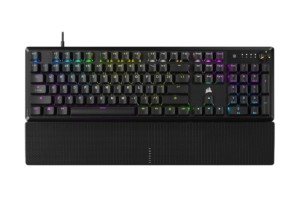
Full-Size | Mechanical | Wired | RGB
If somebody handed me $100 and said, “I just want a good gaming keyboard,” this is probably where I’d start.
The Corsair K70 CORE doesn’t win because it has the craziest technology on this list.
That’s actually why I like it.
You get Corsair’s MLX Red linear mechanical switches, a full-size layout, per-key RGB lighting, an aluminum top plate, sound-dampening foam and a multifunction rotary dial.
Translation for someone who doesn’t want to become a keyboard scientist:
It’s a proper mechanical gaming keyboard with the features most people will actually use.
And because it’s full-size, you’re not giving up your number pad or keys just to make your setup look more “gamer.”
What I Like
- Mechanical switches
- Full-size layout
- Aluminum top plate
- Per-key RGB
- Volume/control dial
- Sound dampening
- 1,000Hz polling
- Doesn’t require spending the entire $100
What I’d Consider
It’s wired.
That doesn’t bother me because my keyboard is wired too. A mouse is constantly moving around my desk, so I understand the appeal of wireless there immediately. My keyboard basically sits in the same spot forever.
I’d need to do more research myself before paying extra specifically for a wireless keyboard.
If you’re already committed to a completely cable-free setup, though, this obviously won’t be your pick.
Who I’d Recommend It To
Almost anyone who wants a traditional gaming keyboard and doesn’t know exactly what specialized feature they need yet.
Get it here: Check the Corsair K70 CORE RGB price on Amazon
Best Value: Keychron C3 Pro
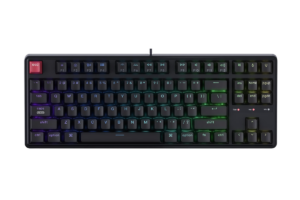
TKL | Mechanical | Wired | RGB/Backlighting Depending on Version
This is the keyboard that makes spending $100 harder to justify.
The Keychron C3 Pro has routinely sold for somewhere around the $40–$50 range, depending on configuration.
And we’re still talking about a mechanical keyboard.
That’s what has changed so much about budget keyboards.
You don’t necessarily need to spend $100 just to get into mechanical switches anymore.
Depending on the C3 Pro configuration, you can get features like hot-swappable switches, programmable controls and customizable backlighting that used to be associated with considerably more expensive keyboards.
What I Like
- Very inexpensive
- Mechanical
- TKL saves desk space
- Great entry point into mechanical keyboards
- Programmable
- Some versions are hot-swappable
- You’re nowhere near our $100 ceiling
What I’d Consider
Pay attention to which version you’re buying.
Keychron sells multiple configurations, and features like RGB and hot-swappable switches can vary.
That’s something I’d specifically check on the Amazon listing instead of assuming every C3 Pro is identical.
But this is exactly the type of keyboard I mean when I say:
“Don’t spend $100 just because your budget is $100.”
If a $40–$50 keyboard gives you everything you need, keep the other $50.
Find it here: Check the Keychron C3 Pro price on Amazon
Best TKL: HyperX Alloy Origins Core
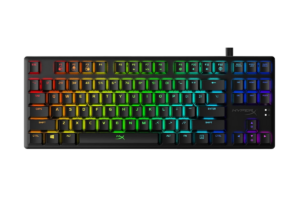
TKL | Mechanical | Wired | Per-Key RGB
The HyperX Alloy Origins Core is a tenkeyless mechanical gaming keyboard built around HyperX’s own mechanical switches.
And TKL is an interesting layout if you’ve only ever used full-size keyboards.
Basically, you lose the number pad.
That’s about it.
The advantage is that the keyboard takes up less space and gives your mouse more room, which can actually matter if you play shooters with a low mouse sensitivity.
What I Like
- Full aluminum body
- Mechanical HyperX switches
- Excellent RGB
- Detachable USB-C cable
- Compact without becoming too compact
- Three onboard profiles
- Broad PC and console compatibility
What I’d Consider
You lose the number pad.
That sounds ridiculously obvious, but I think people sometimes buy compact keyboards because they look cool and then realize:
“Oh. I actually use that.”
Figure that out before you buy it.
Get it here: Check the HyperX Alloy Origins Core price on Amazon
Best 78%: AULA F75
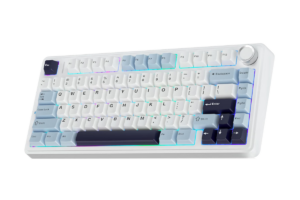
75% | Mechanical | Wired + Wireless | RGB
The AULA F75 is a 75% mechanical keyboard, meaning it cuts down a lot of the empty space of a full-size keyboard while retaining things like arrow keys and a function row.
It’s also available with multiple connection options, including wired USB-C, Bluetooth and 2.4GHz wireless.
And depending on the configuration, you’re getting things like hot-swappable switches, a gasket-mounted design, RGB and a control knob.
That’s a lot of keyboard for the money.
What I Like
- Compact 75% layout
- Mechanical
- Wireless + Bluetooth + wired
- Hot-swappable switches
- RGB
- Control knob
- Strong value
What I’d Consider
This is where buying gets slightly more complicated.
There are different F75 configurations and switch options floating around Amazon.
Again, look at what you’re actually buying.
Find it here: Check the AULA F75 price on Amazon
Best for Competitive Gaming: AULA F75 HE
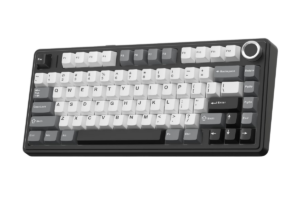
75% | Hall Effect Magnetic Switches | RGB
The F75 HE is where those magnetic switches become relevant.
Instead of traditional mechanical contacts, Hall Effect switches use magnetic sensing to determine key position.
That opens the door for features like adjustable actuation and Rapid Trigger.
For competitive gaming, that’s legitimately interesting.
You can make a key activate with a shallower press and reset more quickly as you release it.
For fast movement inputs in competitive shooters, that can matter.
What I Like
- Hall Effect switches
- Adjustable actuation
- Rapid Trigger
- 75% layout
- RGB
- Competitive-gaming features below $100
What I’d Consider
This might also be the easiest keyboard on the list to overspend on for your particular needs.
Not because the keyboard itself is overpriced.
Because you might be buying technology you don’t need.
If you’re playing competitive shooters and know why you want adjustable actuation?
Awesome.
If you’re playing Resident Evil and occasionally yelling at LEGO Batman?
You probably don’t need Rapid Trigger.
And that’s okay.
Get it here: Check the AULA F75 HE price on Amazon
Best Budget Mechanical: Logitech G413 TKL SE
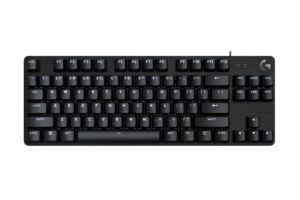
TKL | Mechanical | Wired | White Backlighting
The Logitech G413 TKL SE goes in almost the opposite direction.
- No insane RGB light show.
- No wireless.
- No adjustable magnetic switches.
- No tiny screen displaying a GIF of your dog.
It’s just a straightforward mechanical gaming keyboard.
And I actually appreciate that.
You get tactile mechanical switches, a compact TKL layout, PBT keycaps and an aluminum-alloy top case.
It’s commonly available well below $100, often closer to the lower half of our budget.
What I Like
- Affordable
- Mechanical
- PBT keycaps
- Aluminum top
- Compact TKL layout
- Simple
- Established gaming brand
What I’d Consider
The backlighting is white rather than RGB.
I actually like RGB on my keyboard.
Is it necessary?
Absolutely not.
But I use my computer early in the morning and in darker rooms, and being able to see the letters illuminated is genuinely useful. My kids also like the RGB.
So there’s at least one feature on my gaming keyboard that is simultaneously useful and apparently children’s entertainment.
If you don’t care about RGB, though, Logitech’s simplicity might actually be a positive.
Find it here: Check the Logitech G413 TKL SE price on Amazon
Best Cheap/Quiet Option: SteelSeries Apex 3 TKL
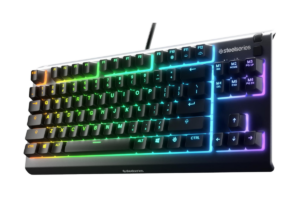
TKL | Membrane | Wired | RGB
The SteelSeries Apex 3 TKL uses membrane switches.
That means instead of individual mechanical switches underneath each key, you’re dealing with a rubber-dome style design.
Generally, membrane keyboards are quieter and cheaper but don’t have the same distinct feel mechanical keyboards are known for.
So why include one?
Because not everybody needs mechanical.
If you’re trying to spend as little as possible, want something quieter and still want gaming features and RGB, the Apex 3 TKL can make sense.
What I Like
- Very inexpensive
- Quiet
- RGB
- TKL layout
- Simple entry-level gaming keyboard
- No need to understand six different switch types
What I’d Consider
At this point, mechanical keyboards have become inexpensive enough that I’d personally look there first.
That’s the problem for membrane keyboards in 2026.
When mechanical options are available around $40–$60, the price advantage isn’t what it once was.
But if noise matters or you simply like a softer keyboard feel, membrane isn’t automatically bad.
Get it here: Check the SteelSeries Apex 3 TKL price on Amazon
Best Compact Alternative: HyperX Alloy Origins 65
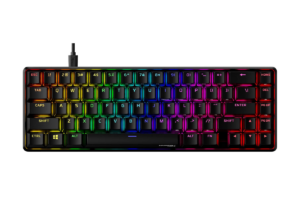
65% | Mechanical | Wired | RGB
I considered going all the way down to a 60% keyboard here.
But I think 65% makes more sense for the average person.
You still get a very compact keyboard, but you retain dedicated arrow keys.
It’s only about 12.4 inches wide, so you’re freeing up quite a bit of desk space.
What I Like
- Very compact
- Still has arrow keys
- Mechanical
- Per-key RGB
- Detachable USB-C
- 1,000Hz polling
- Strong aluminum construction
What I’d Consider
You are giving up keys.
A lot of them.
If you’ve used a full-size keyboard your entire life, I wouldn’t blindly order a 65% keyboard because somebody told you smaller keyboards are better for gaming.
Look at the layout.
Ask yourself whether you use the missing keys.
Then decide.
That’s basically the theme of this entire article.
Find it Here: Check the HyperX Alloy Origins 65 price on Amazon
Do You Need a Wireless Gaming Keyboard?
I don’t know.
And I’m completely okay saying that.
My keyboard is wired.
Unlike my mouse, I’m not dragging my keyboard all over my desk while I’m playing.
So the cable has never bothered me enough to make wireless a priority.
I’d personally need to spend more time researching wireless gaming keyboards before deciding whether I’d pay extra for one.
That doesn’t mean wireless is pointless.
If you’re building a super-clean setup, moving between devices, gaming from farther away or just hate cables, it could absolutely be worth it.
But I wouldn’t spend extra on wireless just because wireless sounds more premium.
Check out the Top 5 Keyboards Worth Your Desk Space
The Biggest Mistake: Overspending
This is the same thing I keep coming back to with gaming gear.
You don’t have to buy the most expensive version.
- Higher-end keyboards can give you genuinely better features.
- Hall Effect switches are real technology.
- Adjustable actuation is real.
- Rapid Trigger is real.
- Higher polling rates are real.
- Hot-swappable switches are useful if you actually want to change them.
None of that means you need it.
Especially if you’re new.
It’s easy to watch somebody who’s been building mechanical keyboards for ten years explain why you absolutely need a particular switch, keycap material, mounting system and polling rate.
Meanwhile, you’re sitting there thinking:
“I just wanted to play Minecraft.”
Buy for where you are.
You can always upgrade later when you actually know why you’re upgrading.
Need a mouse? Check out 10 Best Gaming Mice in 2026 for Every Type of Gamer

Final Verdict
Gaming keyboards under $100 are good enough now that I’d need a pretty specific reason to spend much more.
- The Corsair K70 CORE RGB is my overall pick because it gives most gamers everything they actually need without turning the keyboard into a science project.
- The Keychron C3 Pro is the one I’d look at if value matters most.
- The HyperX Alloy Origins Core makes a ton of sense if you want TKL.
- & If you’re genuinely competitive and know why adjustable actuation and Rapid Trigger matter, that’s when something like the AULA F75 HE becomes interesting.
Just don’t spend $200 because someone convinced you a feature you’ve never heard of is suddenly essential.
There’s nothing wrong with buying really nice gaming gear.
I just want to know what I’m paying for before I pay for it.