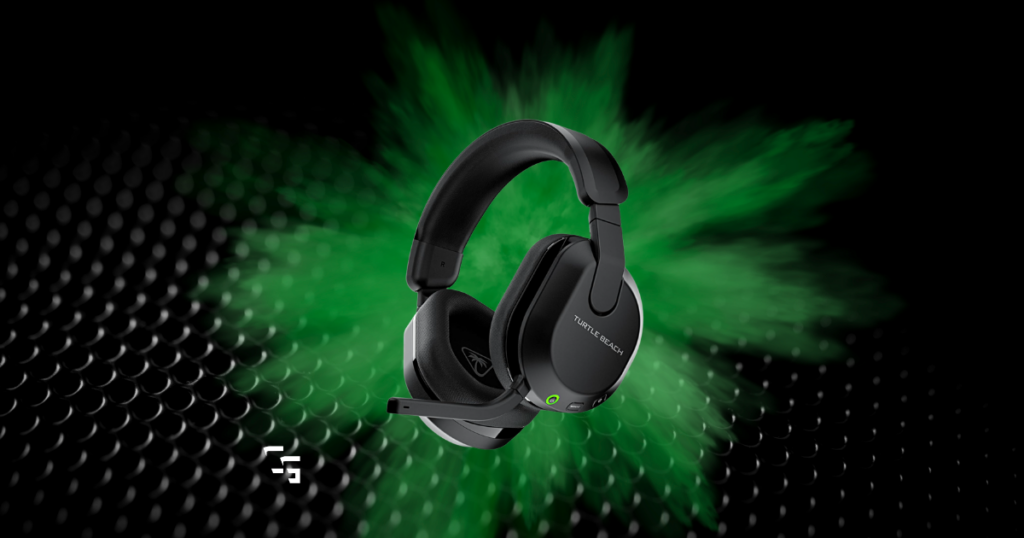
You do not need a $200 gaming headset to get good sound.
I say that as someone who has spent a lot of time gaming with the HyperX Cloud III Wireless. I used it for everything:
- Gaming
- Streaming
- Competitive games
- Story games
And one of the best things I can say about it is pretty simple:
- It just worked
- Good sound
- Comfortable
- Easy to use.
- I never really had anything I felt like I needed to change about it.
I’ve since switched to gaming IEMs, largely because I wear glasses and wanted something that didn’t sit over them for hours at a time. But that hasn’t changed my opinion that a good gaming headset is probably the easiest all-in-one audio solution for most gamers.
And if I had $100 to spend, I’d absolutely expect that headset to include a usable microphone.
So for this list, I focused on the three things I care about most:
Sound. Comfort. Quality.
Then I looked at the microphone, connectivity, compatibility and everything else.
One more thing: $100 is a real ceiling here. I’m okay with including a headset that normally sells a little higher if it’s consistently available under $100, but I’m not calling a $130 headset an “under $100 headset” because Amazon discounted it for six hours last Black Friday.
Let’s find the ones actually worth buying.
Disclosure: Some links in this article may be affiliate links. If you buy something through one of them, I may earn a commission at no additional cost to you. Recommendations outside the gear I’ve personally used are based on product specifications, current pricing, compatibility, owner feedback and independent research.

TL;DR: Best Gaming Headsets Under $100
Best Overall: HyperX Cloud III
Best Budget: Razer BlackShark V2 X
Best Wireless: SteelSeries Arctis Nova 3X Wireless
Best Wired: HyperX Cloud Alpha
Best for FPS: Razer BlackShark V3 X HyperSpeed
Best for Long Sessions: Turtle Beach Stealth 600 Gen 3
Best for Console: SteelSeries Arctis Nova 1
Best Microphone: Logitech G PRO X
If you want the shortest version possible, I’d start with the HyperX Cloud III.
And although my personal experience is with the Cloud III Wireless, that experience is a big reason I’m comfortable keeping HyperX near the top of this list.
Best Overall: HyperX Cloud III
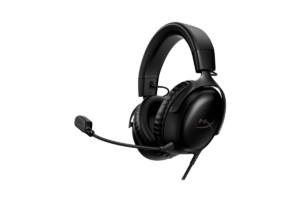
The HyperX Cloud III is my best overall gaming headset under $100 because I don’t see a glaring reason not to recommend it to the average gamer.
You’re getting:
- Angled 53mm drivers
- Memory-foam ear cushions
- Aluminum frame
- Detachable noise-cancelling microphone
- 3.5mm connection
- USB-C
- USB-A adapter
- PC, PlayStation, Xbox, Switch, Mac and mobile compatibility
That’s exactly what I want an overall winner to look like.
It doesn’t win because it has the craziest feature on this list.
It wins because it doesn’t make you choose between a bunch of things.
Why I’d Recommend It
My Cloud III Wireless has been one of those pieces of gaming gear I almost don’t have much to say about. And I mean that as a compliment.
- I plugged it in
- It worked
- It sounded good
- It was comfortable.
I used the microphone for more than a year before moving to a dedicated mic, and it did exactly what I needed it to do.
At current pricing, I’ve found the wired model around the $70–$80 range, although pricing obviously changes.
The Downside
It’s wired.
For me, that’s a legitimate negative because I like getting cables off my desk.
But if you don’t care?
You can get a whole lot of headset here without spending the entire $100.
Best for: Someone who wants one good headset without overthinking it.
Find it here: Check HyperX CloudIII on Amazon
Best Budget Gaming Headset: Razer BlackShark V2 X
If you told me:
“This $40–$60 headset gives me almost everything I need. Should I buy it or spend the entire $100?”
I’d tell you to save your money.
Would I listen to that advice?
Probably not.
I’d convince myself that I might as well spend another $40 because I’m already buying something.
Don’t be me.
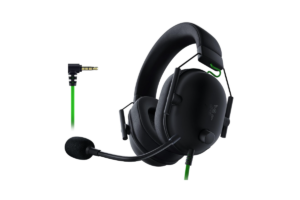
The Razer BlackShark V2 X is exactly the type of headset that makes spending more difficult to justify if you don’t actually need more.
Razer gives it 50mm TriForce drivers, a HyperClear cardioid microphone and a lightweight 240-gram design. The standard 3.5mm model is also currently listed by Razer at $59.99, with prices sometimes falling lower.
Why It Made the List
The price is the big one.
But cheap isn’t enough.
A $25 headset that sounds terrible and hurts after an hour isn’t a good deal.
The BlackShark V2 X gives you a legitimate gaming headset from an established line without getting anywhere near our $100 limit.
It’s also wired through a standard 3.5mm connection, which makes it a simple option across a wide range of devices.
Who Should Buy It?
Someone building their first setup.
Someone who doesn’t care about wireless.
Someone who needs a headset and microphone without spending much.
Or someone who simply understands that having $100 available doesn’t mean you have to spend $100.
Best for: Getting a complete gaming headset while keeping a lot of your budget.
Get it here: Check the Razer BlackShark V2 X on Amazon
Best Wireless Gaming Headset Under $100: SteelSeries Arctis Nova 3X Wireless
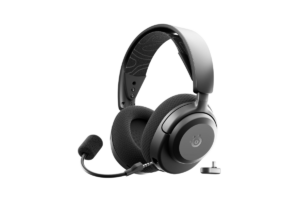
My pick is the SteelSeries Arctis Nova 3X Wireless, particularly because the X version gives us broad platform flexibility.
Current retail pricing has been hovering right around our $100 ceiling, and the headset combines 2.4GHz wireless and Bluetooth with a USB-C dongle.
It also works across Xbox, PlayStation, PC and Switch, which makes the 3X especially attractive if you own more than one system.
Why I’d Spend More for Wireless
If a good wired headset costs $60 and a comparable wireless option costs $80–$90?
I’d probably spend the extra money.
- I like a clean setup
- I don’t like extra cables
- & charging gaming gear doesn’t bother me much because I’m generally pretty good about charging things when I’m done.
That doesn’t make wireless inherently better.
It makes it better for me.
If you’re the opposite and don’t care about the cable, save your money.
One Thing I Like Here
SteelSeries also gives the Nova 3 Wireless line access to more than 200 game-specific audio presets through its companion app, so there’s more room to tweak the experience than you’ll get from some cheaper plug-and-play options. Current models are rated around 40 hours depending on platform/use.
Do you need 200 presets?
Absolutely not.
But having options isn’t a bad thing.
Best for: Someone who wants wireless and plays across multiple platforms.
Find it here: Check the SteelSeries Arctis Nova 3X Wireless on Amazon
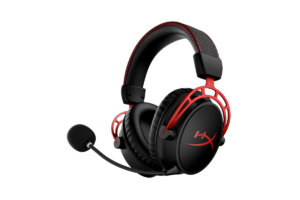
Best Wired Gaming Headset Under $100: HyperX Cloud Alpha
Yes, another HyperX.
I’m okay with that.
We’re picking products based on what fits the category, not trying to make sure every gaming company gets a participation trophy.
The HyperX Cloud Alpha remains an interesting wired option because its dual-chamber driver system separates bass frequencies from the mids and highs, with the goal of reducing distortion and creating cleaner separation.
It’s also currently selling comfortably below $100 at major retailers.
Why Choose This Over the Cloud III?
The Cloud III is my overall choice because I think it’s easier to recommend broadly.
The Cloud Alpha is here for someone specifically looking for a wired value.
If you find the Alpha significantly cheaper than the Cloud III, I wouldn’t automatically spend more.
Look at what you’re actually getting.
Look at what matters to you.
Then decide.
That’s something I wish more people did with gaming gear instead of assuming:
More expensive = better.
It doesn’t.
I’ve written an entire article about why expensive gaming headsets aren’t automatically better, because this is one of the easiest categories to overspend on.
Best for: Someone who doesn’t care about wireless and wants strong value from a proven wired design.
Get it here: Check the HyperX Cloud Alpha on Amazon
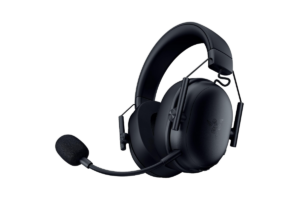
Best Gaming Headset for FPS: Razer BlackShark V3 X HyperSpeed
For FPS, I care less about giant bass and more about whether the headset helps me understand what is happening around me.
- Where are the footsteps?
- Which direction did that shot come from?
- Is somebody above me?
- Below me?
- Behind me?
- That’s especially important in games like The Finals, Call of Duty, Valorant, Apex and basically anything else where positional information matters.
The Razer BlackShark V3 X HyperSpeed is built around that competitive-gaming use case, using Razer’s second-generation 50mm TriForce drivers with low-latency 2.4GHz wireless and Bluetooth. Current retailer listings put it at $99.99 MSRP with sales frequently taking it below that.
Why It Wins FPS
Not everyone needs an “esports headset.”
I certainly don’t.
But if most of what you play is competitive shooters, I’d rather spend my money on something designed around positional clarity and lightweight comfort than pay for features that don’t help me.
The V3 X HyperSpeed also comes in platform-specific versions, including PC/PlayStation and Xbox variants, so make sure you’re buying the correct version for your system.
Best for: Competitive FPS players who want wireless without jumping over $100.
Find it here: Check the Razer BlackShark V3 X HyperSpeed on Amazon
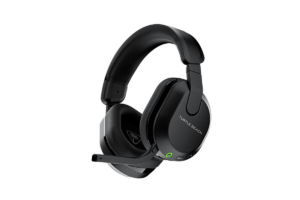
Best Gaming Headset for Long Sessions: Turtle Beach Stealth 600 Gen 3
I wear glasses.
And after sitting at a computer for hours, an over-ear headset pressing my glasses into the side of my head eventually gets annoying.
That’s actually one of the biggest reasons I ended up trying IEMs.
So when we’re talking about a headset for long gaming sessions, I’m looking beyond sound.
The Turtle Beach Stealth 600 Gen 3 specifically includes Turtle Beach’s ProSpecs glasses-friendly design, plus an adjustable headband, cushioned earcups and an advertised battery life of around 80 hours. Current retail pricing regularly drops the headset below $100 even though some stores list it slightly above our limit when it’s not discounted.
Why I Like This Category
Comfort gets ignored way too often.
People compare:
- Drivers
- Frequency response
- Surround sound
- Battery
- Software.
Then you put the headset on and hate wearing it.
None of the other stuff matters anymore.
If you wear glasses like I do, I’d pay particularly close attention to this one.
One Caveat
The regular price can creep above $100 depending on the retailer.
I’ve included it because it is routinely sold below $100 and was available around $90 during my research, not because it once went on some freak one-hour sale.
If it’s $110 when you click?
Wait.
There are too many good headsets in this price range to violate your budget because you’re impatient.
Best for: Long gaming sessions, especially if you wear glasses.
Get it here: Check the Turtle Beach Stealth 600 Gen 3 on Amazon
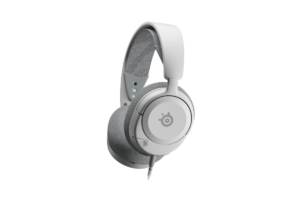
Best Gaming Headset for Console: SteelSeries Arctis Nova 1
Console compatibility gets unnecessarily confusing.
Especially once wireless enters the conversation.
That’s why I like going simple here.
The SteelSeries Arctis Nova 1 uses a standard wired connection and supports PC, PS5/PS4, Xbox and Nintendo Switch. Current listings have it around $60.
Why It’s My Console Pick
- You don’t need to spend your entire budget.
- You don’t need to wonder whether you bought the Xbox-specific wireless version.
- You don’t need another dongle hanging out of something.
Plug it in and play.
That’s a quality I really appreciated about my HyperX headset:
Ease of use matters.
Sometimes:
- I don’t want another app.
- I don’t want to troubleshoot Bluetooth.
- I don’t want to Google why my $150 piece of gaming gear suddenly stopped talking to my PC.
- I want it to work.
The Nova 1 also includes a retractable noise-cancelling microphone and a lightweight design, so we’re not giving up the basics just for compatibility.
Best for: Someone who moves between consoles or just wants something uncomplicated.
Find it here: Check the SteelSeries Arctis Nova 1 on Amazon
Best Gaming Headset Microphone Under $100: Logitech G PRO X
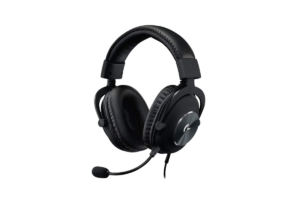
If your microphone matters more than it does to the average gamer, the Logitech G PRO X is the one I’d look at.
The big differentiator is Logitech’s Blue VO!CE microphone processing on PC, which gives you access to things like:
- Noise reduction
- Compression
- Limiting
- & other voice controls.
It uses a detachable condenser microphone alongside 50mm PRO-G drivers, and Logitech includes both memory-foam leatherette and cloth ear pads.
Why Mic Quality Matters More at This Budget
If you’re spending $100 total, I don’t love the advice:
“Buy these headphones. The mic sucks, but just buy a separate microphone.”
Okay…
Now we’re not spending $100 anymore.
If you’re gaming with friends, using Discord, playing competitively or starting to stream and don’t already own a dedicated microphone, the headset mic matters.
I streamed for more than a year using my HyperX headset microphone.
Was it as good as my dedicated FIFINE AM8 PRO-T?
No.
Did it need to be?
Also no.
It worked.
There’s One Catch Here
The G PRO X sits right on the edge of our rule.
Its normal price can exceed $100, but it has been consistently available around $100 during current shopping.
So my advice is easy:
If it’s $100 or less, consider it.
If it’s $130?
Nope.
Wait for it to come back down or buy something else.
Best for: Discord, multiplayer and beginning streamers who aren’t buying a separate microphone yet.
Get it here: Check the Logitech G PRO X on Amazon
Should You Spend the Full $100?
No.
You should spend as much as necessary to get what you want.
That’s different.
If the $60 headset gives you 90% of what the $100 headset gives you and you’re completely happy with it, take the $40.
- Buy a game.
- Put it toward a better controller.
- Buy your kids something.
- Keep it in your bank account.
- Whatever.
You don’t get bonus gamer points because you managed to spend exactly $100.
That said…
Would I personally look at the $60 headset and then spend the extra $40 anyway?
Probably.
I’m working on it.
More on all this in The Headset Myth: Expensive Doesn’t Mean Better
Wired or Wireless Under $100?
This is where budget actually changes my recommendation a little.
If you want the most headset for your money, wired is hard to beat.
You’re not paying for:
- Wireless hardware
- Battery
- Charging
- Wireless receiver
- Bluetooth
That money can go toward the actual headset.
But wireless under $100 has gotten legitimately good.
So I wouldn’t tell you to avoid it either.
My rule would be:
If wireless matters to you, buy wireless.
If it doesn’t?
Don’t pay extra for it.
And if you’ve already decided that the cable is absolutely not coming back to your desk, I have a separate guide to the Best Wireless Gaming Headsets in 2026 that goes deeper into that category.
What About Gaming IEMs?
This is the weird wrinkle in this entire conversation for me.
I used traditional gaming headsets for years.
Then I tried the SIMGOT EW300.
And now I use IEMs for basically everything.
- They’re lighter.
- They don’t press against my glasses.
- They don’t make my head hot.
- And after I finally figured out that I had connected the left and right cables backward (yes, really) the directional audio has been great too.
But there’s a huge difference for someone shopping with a strict $100 budget:
Most gaming IEMs don’t solve your microphone problem.
I already own a dedicated FIFINE microphone.
So that’s fine for me.
If you’ve got $100 total and still need both game audio and voice chat, a gaming headset makes way more sense.
That’s why I haven’t tried to sneak an IEM onto this list.
If you know you want IEMs, check out Best Gaming IEMs in 2026 (and Why Gamers are Ditching Headsets)
Final Verdict
You have $100.
You don’t have to spend $100.
That’s probably the biggest takeaway from this entire article.
- The HyperX Cloud III is my overall pick because it does just about everything I want from a gaming headset without requiring the entire budget.
- The Razer BlackShark V2 X proves you can spend considerably less.
- And the SteelSeries Arctis Nova 3X Wireless shows that wireless isn’t automatically a premium-only feature anymore.
Don’t buy based on the biggest number on the box.
Don’t buy something because it’s the most expensive option you can afford.
And don’t automatically buy my #1 pick.
Weigh the pros and cons.
Figure out whether you care about wireless, microphone quality, platform compatibility, weight or anything else.
Then spend what you need to spend.
Not what the budget says you’re allowed to.