The Truth About Streaming Gear
When most people think about getting into streaming, they imagine a crazy setup with multiple cameras, professional lighting, and a mic that looks like it belongs in a recording studio. But here’s the truth: You don’t need half the stuff you think you do.
If you’re just getting started, focus on the essential things that actually improve your stream without draining your bank account. This is exactly How I Built My On Gaming Website & Brand. I focused on what was actually important.
This guide breaks down what’s necessary, what’s nice to have, and what’s completely overrated.
Some links may be affiliate links, meaning I may earn a commission at no extra cost to you. But these are tools I trust, use, or genuinely recommend.
Must-Have Streaming Gear (Don’t Skip These)
- A Decent Mic (Because Nobody Wants to Hear a Jet Engine)
The biggest mistake new streamers make? Using a bad mic.
If your audio is garbage, people will leave instantly. You can get away with a basic camera, but bad audio is unforgivable.
Best Budget Mics:
- Blue Yeti Nano – Solid quality, easy to use (Cheap)
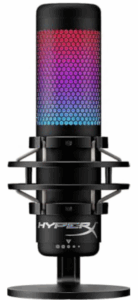
- HyperX QuadCast S – Built-in pop filter, great sound (Around $130)
If You Want to Go High-End:
- Shure SM7B – The GOAT of streaming mics (~$400, but you need an audio interface too)
Pro Tip: If you’re just starting, don’t waste money on XLR mics and fancy mixers. A simple USB mic works fine.
- A Camera (That Doesn’t Make You Look Like You’re Streaming from a Potato)
You don’t need a DSLR to start streaming. If you’re on a budget, a solid webcam will do the job.
Best Budget Cameras:
- Logitech C920 – The gold standard ($60)
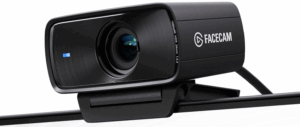
- Elgato Facecam – Sharp 1080p, great low-light ($150)
Want to Go High-End?
- Sony ZV-1 + Elgato Cam Link – Full DSLR-like quality (~$750+)
Pro Tip: Lighting is more important than camera quality. A basic camera with good lighting looks way better than an expensive camera in a dark room.
- A Good Capture Card (For Console Streamers & Dual PC Setups)
If you’re streaming from a PlayStation, Xbox, or a dual-PC setup, you’ll need a capture card.
Best Options:
- Elgato HD60 X – Great for 1080p 60FPS ($150)
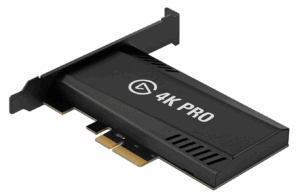
- Elgato 4K60 Pro – Best for 4K streaming ($250)
A Dual Monitor Setup (Game on One, Stream on the Other)
If you’re streaming from a single screen, just stop. Trying to game and manage chat on one monitor is miserable.
Best Budget Monitor:
- Acer Nitro XF243Y – 1080p, 165Hz, great price (~$150)
For High-End Setups:
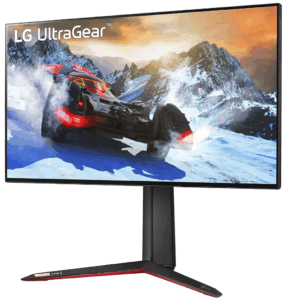
- LG UltraGear 27GN950-B – 4K, 144Hz (~$800)
Pro Tip: Don’t blow your budget on a second monitor. Just get a cheap one for chat & OBS. If you need some extra help choosing a monitor, check out the Best Monitors for Competitive Gaming.
Streaming Software (Because Free is Good)
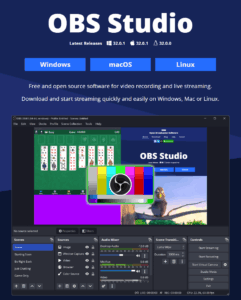
Use OBS Studio or Streamlabs OBS. They’re free, easy to use, and all the pros use them.
- Nice-to-Have Streaming Gear (Upgrade Later)
- Better Lighting (Makes You Look 10x More Professional)
- A cheap ring light makes a massive difference.
Don’t buy expensive studio lights unless you really need them.
Best Budget Option:
- Neewer Ring Light (~$40) – Simple, effective
- A Stream Deck (Optional, But Nice to Have)
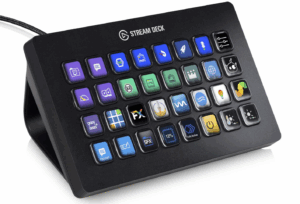
If you love shortcuts and want to level up your stream’s production, a Stream Deck is amazing.
- Elgato Stream Deck Mini (~$80) – 6 buttons, does the job
- Elgato Stream Deck XL (~$200) – 32 buttons, pro-level control
Overrated Gear (Don’t Waste Your Money)
- Overpriced Green Screens – Unless you actually need to remove your background, just use NVIDIA Broadcast or OBS.
- Overkill PCs – Streaming doesn’t need a $4,000 PC. If you have a solid CPU and GPU, you’re good.
- DSLR Cameras for Beginners – Webcams work fine. If you’re not already making money from streaming, don’t waste $1,000 on a DSLR setup.
Final Thoughts: Start Simple, Upgrade Later
If you’re just getting started, don’t fall into the trap of thinking you need a Hollywood-level setup. Focus on good audio, decent video, smooth gameplay, and Avoiding Burnout While Building Your Brand.
Your First Steps:
- Get a good mic (Blue Yeti, HyperX QuadCast)
- Grab a decent webcam (Logitech C920, Elgato Facecam)
- Set up a second monitor (even a cheap one)
- Download OBS Studio and start streaming
Once you start growing, you can upgrade.