
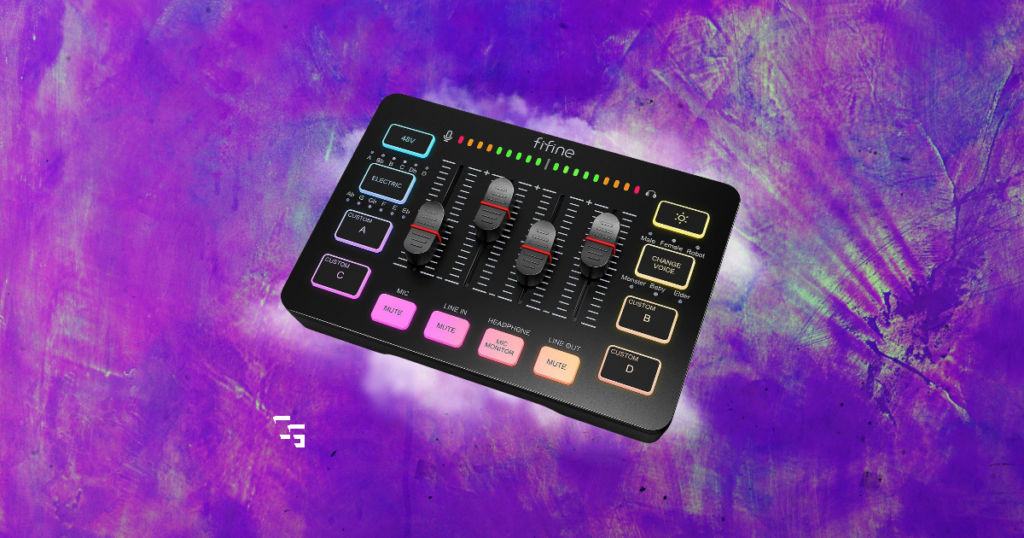
Since upgrading my microphone, I’ve spent way too much time looking at audio mixers.
Right now, I’m using my FIFINE AM8 PRO-T over USB.
- It works
- It sounds good
- And after plenty of messing around with OBS filters, I’ve gotten it to a place I’m pretty happy with.
But the AM8 PRO-T also has an XLR connection sitting on the back of it.
Moving to XLR opens the door to mixers and audio interfaces that give you more control over your microphone, headphones and everything else happening with your audio.
But once I started researching them, I realized “audio mixer” can mean very different things depending on what you’re creating.
- A streamer might want separate control over their mic, game and Discord.
- A podcaster might need two microphones.
- Someone recording music might care more about clean preamps and instrument inputs than RGB buttons.
- And someone making YouTube videos might just want their microphone to sound good without turning their desk into a recording studio.
So instead of limiting this to streaming, these are the audio mixers and interfaces I’d actually consider for content creation in 2026.
This post contains affiliate links. If you buy something through one of these links, I may earn a commission at no additional cost to you.

TL;DR
- Best Overall — Elgato Wave XLR MK.2
- Best Budget — FIFINE AmpliGame SC3
- Best Budget Alternative — MAONO MaonoCaster G1 NEO
- Best for Recording & Music — Focusrite Scarlett 2i2 4th Gen
- Best for Podcasts — RØDECaster Duo
- Best Premium — Elgato Wave XLR Pro
For my own setup, I’d probably buy the FIFINE AmpliGame SC3.
That doesn’t mean it’s the right one for everybody.
And if you’re currently using a USB microphone that sounds perfectly fine?
You might not need any of these.
Best Overall: Elgato Wave XLR MK.2
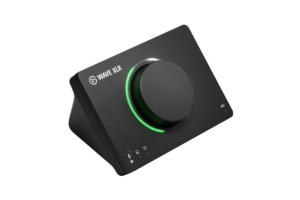
The Elgato Wave XLR MK.2 is technically more audio interface than traditional physical mixer, but that’s part of why I like it for content creation.
Instead of covering your desk with sliders and buttons, Elgato combines a compact XLR interface with its Wave Link software.
You get:
- 80 dB of gain
- 48V phantom power
- Headphone monitoring
- Onboard audio processing
- Clipguard 2.0
- And support for VST effects.
Then Wave Link handles the mixing and routing side on your computer.
For a solo creator, that seems like a really nice balance.
Why I’d pick it
Look at what I’m actually doing.
- I have one microphone
- One PC
- I stream
- I record YouTube videos
- I make Shorts
I’m not recording six people sitting around a table.
So I don’t necessarily need a giant physical mixer.
I want to plug my microphone in over XLR, control it easily and have better control over everything going into my stream or recording.
I also already own a Stream Deck MK.2 , and Elgato lets you control Wave Link and the Wave XLR through Stream Deck.
Instead of paying for a huge mixer just because I want more physical controls, I can use hardware that’s already sitting on my desk.
At around $170, it’s not the cheapest way into XLR.
But it’s the one that makes the most sense to me.
Best for: Streamers, YouTubers and solo creators who want XLR without building a full audio studio.
Get it here: Check Elgato Wave XLR MK.2 price on Amazon
Best Budget: FIFINE AmpliGame SC3
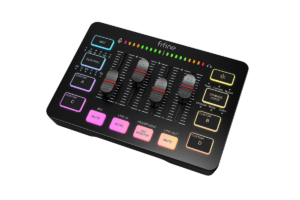
There’s already a FIFINE microphone sitting six inches from my face every morning.
The FIFINE AmpliGame SC3 is much more like what I originally pictured when I started looking at mixers.
- Faders
- Mute buttons
- RGB
- Sound-effect buttons
- Mic monitoring
- XLR
- Actual physical controls
And it’s only around $50–$60.
That’s a very different investment from some of the equipment farther down this list.
This makes a lot of sense as a first mixer
The SC3 provides up to 50 dB of gain, so it doesn’t have anywhere near the headroom of something like the Wave XLR MK.2.
You’ll want to make sure that’s enough for your microphone.
But if it is?
This gives you a cheap way to find out whether you even like having a mixer.
That’s something I’ve learned from buying other streaming equipment.
I’d rather discover I won’t use a $50 mixer than a $500 one.
Best for: New streamers and creators who want physical controls without spending much.
Find it here: Check FIFINE AmpliGame SC3 price on Amazon
Best Budget Alternative: MAONO MaonoCaster G1 NEO
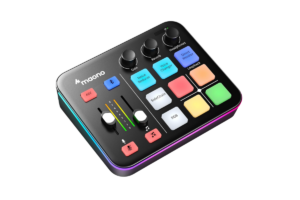
If the FIFINE doesn’t fit your setup, I’d look at the MAONO MaonoCaster G1 NEO next.
It’s another creator-focused audio mixer/interface that sits around the $60 range.
And like the FIFINE, this isn’t really trying to be a studio console.
It’s designed around things like
- Gaming
- Livestreaming
- And content creation.
There are audio mixers out there with enough inputs to mic an entire drum kit.
They’re great.
I have absolutely no use for them.
Something like the G1 NEO gives a new creator the XLR connection and physical controls they’re probably looking for without adding a bunch of stuff they don’t understand or need.
FIFINE or MAONO?
For me? I’d probably try the FIFINE first.
I’ve already had a good experience with my AM8 PRO-T, so I’m at least familiar with the brand.
But I wouldn’t automatically pair two products together just because their logos match.
- Look at your microphone.
- Look at how much gain it needs.
- Look at the inputs.
- Look at the controls.
- Then decide.
The logo should be pretty far down that list.
Best for: Budget-conscious creators who want an affordable XLR mixer/interface.
Get it here: Check MAONO MaonoCaster G1 NEO price on Amazon
Best for Recording & Music: Focusrite Scarlett 2i2 4th Gen
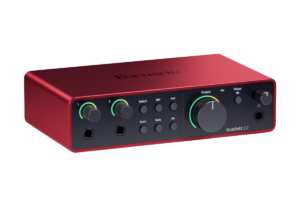
The Focusrite Scarlett 2i2 4th Gen isn’t really a streaming mixer.
It’s an audio interface.
But if you’re a content creator who also records
- Vocals
- Instruments
- Music
- Or multiple microphones
…it might make more sense than buying something covered in gaming buttons.
The 2i2 gives you:
- Two microphone preamps with up to 69 dB of gain
- Auto Gain
- Clip Safe
- Instrument inputs
- And recording up to 24-bit/192 kHz
It also supports loopback, which makes it useful for capturing computer audio alongside your microphone.
This is the one I’d look at if you go beyond streaming
Your needs are most likely different from mine.
I care heavily about OBS and livestreaming because that’s what I actually do.
Say you:
- Make YouTube videos
- You also record a podcast
- You play guitar.
- Maybe you make music.
Someone recording music might care much more about getting two clean inputs into their computer and working inside a DAW.
That’s why I don’t think there is one universal “best mixer.”
The Scarlett doesn’t give you the fun physical streaming controls of the FIFINE.
It isn’t trying to.
It’s an audio interface first.
And for the right creator, that’s better.
Best for: Musicians, voiceover creators and anyone who records audio in addition to making videos or streams.
Find it here: Check Focusrite Scarlett 2i2 4th Gen price on Amazon
Best for Podcasts: RØDECaster Duo
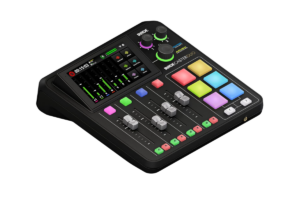
The RØDECaster Duo is an actual all-in-one audio production studio.
You’ve got:
- Two microphone/instrument combo inputs
- Four physical faders
- Three virtual faders
- Programmable SMART pads
- Two headphone outputs
- Bluetooth
- Dual USB connectivity
- And a touchscreen.
Its preamps offer up to 76 dB of gain, and there’s onboard audio processing for things like EQ, compression and noise control.
You can also record directly to microSD or USB storage.
This makes way more sense for a podcast
Imagine two people sitting across from each other.
- Two XLR microphones
- Two sets of headphones
- Sound effects
- Music
- A remote guest
- Maybe you’re recording the whole thing locally while also sending audio to a computer
Now I understand spending the money.
The RØDECaster Duo is built to handle an actual production.
Would I buy one for my current setup?
No.
Would I like one?
Of course.
But I’d be paying for a lot of features I currently wouldn’t use.
Best for: Podcasters, interviews, multi-mic productions and creators with more complicated audio setups.
Get it here: Check RØDECaster Duo price on Amazon
Best Premium: Elgato Wave XLR Pro
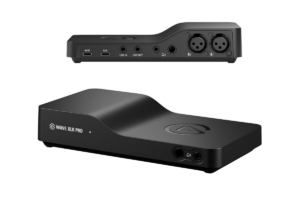
The Elgato Wave XLR Pro takes the idea behind the smaller Wave XLR and expands it into something much more capable.
You get:
- Two XLR microphone inputs
- Two headphone outputs
- Line input and output
- Two USB-C connections
- 80 dB of gain
- Onboard processing
- And much more advanced routing through Wave Link
It can handle multiple microphones and multiple mixes, and it’s built for setups that go beyond one person talking into one mic.
It can even operate in a standalone mode.
Why wouldn’t I just buy this instead?
Because that’s how I end up spending $350 to solve a $170 problem.
- I have one microphone
- I have one pair of IEMs
- I have one PC
- I’m one guy sitting at a desk playing video games at an unreasonable hour in the morning
What exactly am I doing with the second microphone input?
Maybe my setup grows into it eventually.
Maybe it doesn’t.
I’d rather buy what makes sense now.
If you’re already running:
- Two microphones
- Multiple computers
- Separate mixes
- Or a much more complicated production workflow
…then the Pro becomes much easier to justify.
Best for: Serious creators who know they need multiple microphones, advanced routing or room for a larger production setup.
Find it here: Check Elgato Wave XLR Pro price on Amazon
Do Content Creators Actually Need an Audio Mixer?
No.
I don’t own one.
That’s probably useful context in an article telling you which ones I’d buy.
I’m currently using the FIFINE AM8 PRO-T over USB.
- Plug it into my computer
- Select it in OBS
- Done
I’ve added:
- Noise suppression
- A gate
- EQ
- Compression
- And a limiter inside OBS
I’ve spent enough time messing with all of it that I’m pretty happy with how the microphone sounds.
A mixer wouldn’t suddenly make my content good.
Start simple
If you’re buying your first microphone, I wouldn’t automatically start shopping for:
- A microphone
- Mixer
- XLR cable
- Headphone amp
… and three other boxes you saw on somebody’s desk.
Get a decent USB microphone.
- Learn how to use it
- Figure out your levels
- Learn some basic audio
- Make stuff
Eventually you might run into something you actually want to improve.
That’s where I’m at now.
I’m not looking at XLR because somebody told me USB microphones aren’t “professional.”
I’m looking because I’ve been creating long enough that more audio control sounds useful to me.
Why I’m Considering Moving From USB to XLR
The nice thing about my FIFINE AM8 PRO-T is that I don’t have to choose forever.
It supports USB and XLR.
USB has been incredibly easy.
But XLR would let me put an external interface or mixer between my microphone and computer.
That gives me more flexibility over how the audio gets handled and opens the door to better physical controls and a more expandable setup.
And now I’m interested.
Would I have cared when I first started?
Not at all.
Back then I was still figuring out OBS.
Adding another piece of equipment with a bunch of knobs would’ve given me another thing to mess up.
There’s nothing wrong with upgrading.
I just think you should know why you’re upgrading.
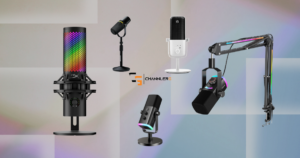
Don’t miss the Best Gaming & Streaming Microphones in 2026
Which Audio Mixer Would I Buy?
After researching all of these, I keep coming back to the Elgato Wave XLR MK.2
It fits what I actually do.
- One microphone
- One PC
- OBS.
- YouTube
- Stream Deck
I don’t need to run an entire podcast studio.
I want to connect my AM8 PRO-T over XLR, have good microphone control and get more flexibility with the rest of my audio.
The Wave XLR MK.2 seems like the right level for me.
- If I wanted to try XLR without spending much? I’d look hard at the FIFINE SC3.
- If I were starting a two-person podcast? RØDECaster Duo.
- If I were primarily recording music? Focusrite Scarlett 2i2.
That’s why I like this list better than simply declaring the most expensive mixer the winner.
We’re doing different things.
The best equipment is the equipment that actually fits what you’re trying to create.
Ready for more? Check out What Should I Upgarde First in my Gaming Setup?
Don’t Upgrade Just Because You Can
I’ve fallen into this trap plenty of times with gaming and streaming gear.
You start researching one little upgrade.
Then suddenly you’re watching somebody on YouTube with a $4,000 setup explaining why the equipment you were perfectly happy with yesterday is apparently unusable.
It’s easy to convince yourself you need everything.
You don’t.
- My USB microphone works.
- My audio sounds good.
- I’m still making content with it.
Eventually I’ll probably move to XLR because I want more control and I genuinely use this equipment all the time.
When I do, I’ll know exactly why I’m spending the money.
That’s how I think upgrades should work.
Solve the problem you actually have today.
You can worry about the studio you’re supposedly building three years from now when you get there.