

For FPS games, the best mice combine extremely accurate tracking, low latency, low weight, and (maybe most importantly) a shape you can actually control comfortably.
The good news is that gaming mice have gotten ridiculously good.
The bad news is that now we have to figure out which ridiculously good mouse is actually worth buying.
So that’s what I did.
I compared the current FPS-focused mice I’d consider in 2026, from sub-$100 wired options to some pretty ridiculous flagship wireless mice.
Here are the seven that stood out.
Disclosure: This post contains affiliate links. If you buy something through one of these links, I may earn a commission at no additional cost to you.

TL;DR
- Best Overall: Razer Viper V4 Pro
- Best Premium: Logitech G PRO X2 SUPERSTRIKE
- Best Ergonomic: Razer DeathAdder V4 Pro
- Best Wired: Endgame Gear OP1 8K V2
- Best Lightweight: Pulsar X2 CrazyLight
- Best Budget: MCHOSE L7 Pro
- Best Value: Razer Viper V3 Pro
If I wanted one of the best FPS mice available right now and didn’t care about price, I’d start with the Razer Viper V4 Pro.
But don’t assume you need to spend flagship money.
There are some seriously good cheaper options on this list.
What Actually Matters in an FPS Mouse?
More DPI does not automatically make a mouse better.
You’re going to see some absolutely stupid numbers in 2026. We’re talking 30,000, 40,000 and even 50,000 DPI.
Very few people are actually playing shooters anywhere near those sensitivities.
What matters more is whether the sensor tracks your movements accurately and consistently.
Then there’s latency. When you click, you want that input registered as quickly as possible. The same applies when you’re tracking someone across the screen or flicking onto a target.
Weight matters too.
A lighter mouse takes less effort to start and stop, which can make quick adjustments and large low-sensitivity movements easier. That doesn’t mean the lightest mouse automatically wins, but there’s a reason competitive FPS mice have gotten incredibly light.
And finally:
Shape.
You can buy the most technologically advanced mouse on this list, but if you hate holding it, none of those specs are going to save it.
If you’re shopping more generally and don’t primarily play shooters, I’ve also put together my 10 Best Gaming Mice in 2026 for Every Type of Gamer

Best Overall: Razer Viper V4 Pro
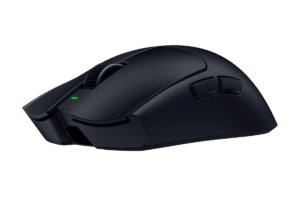
If the goal is simply finding one of the best FPS gaming mice you can buy in 2026, the Razer Viper V4 Pro is where I’d start.
Razer took an already excellent competitive mouse and somehow shaved even more weight off it.
The black version weighs around 49 grams, yet you’re still getting:
- Wireless connectivity
- Up to an 8,000Hz polling rate
- Razer’s Focus Pro 50K optical sensor
- & Optical switches
That’s a ridiculous amount of performance packed into something that barely weighs anything.
The symmetrical shape also makes this a relatively safe recommendation compared with some more aggressively shaped FPS mice. It’s particularly well suited to claw and fingertip grips.
Battery life is excellent too, reaching up to around 180 hours at 1,000Hz. Cranking the polling rate all the way to 8,000Hz cuts that considerably, which is another reason I wouldn’t automatically max everything out just because you can.
Why I’d Buy It
You’re not really making an obvious performance compromise.
It’s extremely light, extremely responsive, wireless and built almost entirely around competitive gaming.
What I Don’t Love
It’s expensive.
And we’re at a point where the differences between high-end FPS mice can become incredibly small.
The Viper V4 Pro may technically outperform cheaper mice, but that doesn’t mean buying it suddenly makes you better at Counter-Strike.
Unfortunately, Razer hasn’t figured out how to sell aim yet.
Best for: Competitive FPS players who want flagship performance without worrying about the price.
Get it here: Check Razer Viper V4 Pro price on Amazon
Best Premium: Logitech G PRO X2 SUPERSTRIKE
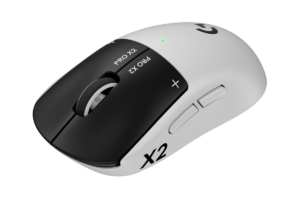
This might be the most interesting mouse on this list.
The Logitech G PRO X2 SUPERSTRIKE doesn’t just use another variation of the same mouse switch we’ve seen forever.
Logitech replaced traditional main-button microswitches with its Haptic Inductive Trigger System.
Basically, your left and right clicks now have adjustable actuation.
You can:
- Change how far you have to press before the mouse registers a click
- Adjust how quickly the button resets
- & even change the intensity of the haptic feedback
If that sounds suspiciously like what gaming keyboards have been doing with adjustable actuation and rapid trigger:
Yeah. Pretty much.
Combine that with Logitech’s HERO 2 sensor, up to 8,000Hz reporting, wireless connectivity and roughly 90 hours of battery life, and this is one seriously advanced FPS mouse.
Why Isn’t It Best Overall?
Because being technologically cooler doesn’t automatically make something better for everyone.
The SUPERSTRIKE weighs around the low-60-gram range, while the Viper V4 Pro comes in around 49 grams.
And once we’re talking about mice with latency this low, we’re chasing incredibly small differences.
I love the idea of adjustable mouse clicks.
I just wouldn’t tell someone they need them.
What I Don’t Love
You’re paying a premium for technology that most players absolutely do not need.
But if you’re the person who wants to customize basically every part of how your mouse responds?
This is awesome.
Best for: Competitive players who want the newest mouse technology and maximum customization.
Find it here: Check Logitech G Pro X2 Superstrike price on Amazon
Best Ergonomic: Razer DeathAdder V4 Pro
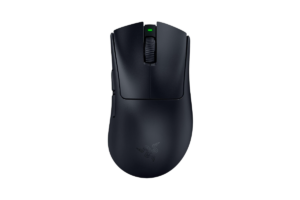
Not everyone likes the flatter symmetrical shape used by a lot of esports mice.
That’s where the Razer DeathAdder V4 Pro comes in.
Instead of trying to make one mouse work for everyone, the DeathAdder uses a larger right-handed ergonomic shape.
And somehow it still weighs only around 56 grams.
You’re getting:
- Up to 8,000Hz polling in wireless or wired mode
- Razer’s Focus Pro 45K sensor
- Optical switches
- & up to around 150 hours of battery life at 1,000Hz
Performance isn’t the reason to choose this over the Viper V4 Pro, though.
Shape is.
If you’ve got larger hands, use a palm-heavy grip or simply prefer an ergonomic mouse, I’d take the DeathAdder seriously.
That’s something spec sheets can’t decide for you.
What I Don’t Love
The shape isn’t nearly as universal.
If you like small mice or use a fingertip grip, I’d look elsewhere. But that’s exactly why it belongs here.
Best for: FPS players who want flagship performance with a larger ergonomic shape.
Get it here: Check Razer DeathAdder V4 Pro price on Amazon
Best Wired: Endgame Gear OP1 8K V2
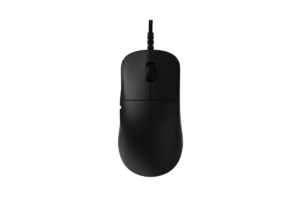
Wireless gaming mice are good enough now that you absolutely don’t need a cable for competitive FPS gaming.
But that doesn’t mean wired mice suddenly suck.
The Endgame Gear OP1 8K V2 is proof.
It weighs just under 50 grams, uses a high-end PixArt sensor and supports a true 8,000Hz polling rate.
- There’s no battery to charge.
- No wireless receiver to worry about.
- No power-saving behavior.
Just plug it in and go.
It also uses a relatively narrow shape designed heavily around claw grip, and the main switches can even be swapped without soldering.
At roughly the $90 range, that’s a lot of mouse.
Wired vs. Wireless
I personally prefer wireless mice because I like eliminating cables from my desk.
But that’s preference, not performance.
Modern wireless mice are incredibly fast, and a good wired mouse is still incredibly fast.
For FPS games alone, either can work.
I’ve gone deeper into that choice in Best Wireless Gaming Mice in 2026: 10 Picks Worth Buying

What I Don’t Love
There’s a wire…
If that doesn’t bother you, this becomes a much easier recommendation.
Best for: Competitive players who don’t care about wireless and want maximum performance for less money.
Find it here: Check Endgame Gear OP1 8K V2 price on Amazon
Best Lightweight: Pulsar X2 CrazyLight

Apparently 50 grams wasn’t light enough.
The Pulsar X2 CrazyLight takes things into absurd territory.
The Mini version can weigh around 35 grams, while the Medium sits around 39 grams, depending on configuration.
Despite the weight, you’re still getting:
- Pulsar’s flagship sensor
- Optical switches
- & support for up to 8,000Hz polling
This isn’t some hollowed-out novelty mouse designed exclusively to win a spec-sheet competition. It’s genuinely built for competitive gaming.
The symmetrical shape is especially suited to claw and fingertip grips, and having multiple sizes makes it easier to find something that actually fits your hand.
Do You Need a 35-Gram Mouse?
Absolutely not.
But that’s not the point of this article.
We’re looking for the best mice for FPS games, and if you specifically want the least resistance possible during fast flicks and large movements, the CrazyLight deserves to be here.
What I Don’t Love
Ultra-light mice aren’t automatically comfortable for everyone.
Some people actually prefer a little more weight because it gives them a stronger feeling of control.
This is one of those products I’d buy because you specifically want an ultra-light mouse, not because someone on YouTube told you 35 grams is objectively better than 50.
Best for: Low-sensitivity FPS players and anyone obsessed with reducing mouse weight.
Get it here: Check Pulsar X2 CrazyLight price on Amazon
Best Budget: MCHOSE L7 Pro

This is where the FPS mouse market gets kind of hilarious.
You can spend well over $150 on a flagship gaming mouse.
Or you can buy something like the MCHOSE L7 Pro.
The L7 Pro weighs roughly 39 grams, offers multiple connection modes and is built around the same basic philosophy as much more expensive competitive mice:
- Keep it light.
- Keep the sensor responsive.
- Get everything unnecessary out of the way.
And that’s why I like it as the budget pick.
So Why Spend More?
Build quality, software, support, warranty experience and overall refinement still matter.
Buying from Razer or Logitech also gives you a much more established ecosystem behind the product.
That’s part of what you’re paying for.
But purely from an FPS-performance perspective, budget mice have gotten really good.
That’s great news if you’re building an entire gaming setup and would rather put another $100 toward your monitor, keyboard, GPU or literally anything else.
What I Don’t Love
It’s a smaller brand with less of a track record than Razer or Logitech.
That’s a legitimate compromise.
But I’d rather tell you that than pretend spending $150+ is a requirement for competitive FPS gaming.
It isn’t.
Best for: FPS players who care much more about performance than the logo on the mouse.
Find it here: Check MCHOSE L7 Pro price on Amazon
Best Value: Razer Viper V3 Pro
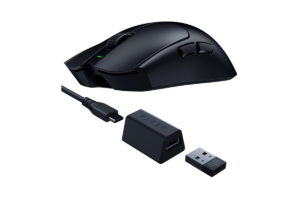
The release of the Viper V4 Pro created an interesting problem for Razer.
The Viper V3 Pro didn’t suddenly become bad.
This was already one of the strongest competitive gaming mice available.
- It weighs around 54 grams
- Has excellent wireless performance
- Supports up to 8,000Hz polling
- & uses Razer’s Focus Pro optical sensor.
The V4 is lighter. It’s newer. Its sensor is newer. Battery life is better.
It’s the better mouse.
But here’s what actually matters:
How much cheaper is the V3 when you’re buying?
If the Viper V3 Pro is heavily discounted while the V4 is sitting at full price, I’d have a hard time telling the average FPS player that they absolutely need the newer model.
We’re already talking about incredibly high-performing mice.
This is exactly where I think people get trapped when buying gaming gear.
New doesn’t make the previous version obsolete.
What I Don’t Love
If the V3 and V4 are nearly the same price, just buy the V4.
This recommendation only works when you’re actually saving meaningful money.
Best for: Anyone who wants near-flagship FPS performance without automatically buying the newest model.
Get it here: Check Razer Viper V3 Pro price on Amazon
Wireless or Wired for FPS Games?
At this point, I wouldn’t avoid wireless because you’re worried about latency.
Modern high-end wireless gaming mice are absurdly responsive.
The bigger differences are convenience and price.
Wireless gives you a cleaner desk and zero cable drag.
Wired gives you no battery to charge and usually costs less.
Pick whichever makes more sense for your setup.
If you want wired, check out the Best Wired Gaming Mice in 2026: 10 Worth Buying

Which FPS Mouse Should You Buy?
- If I wanted the strongest all-around FPS mouse on this list, I’d buy the Razer Viper V4 Pro.
- If I wanted to experiment with the newest technology and adjustable mouse clicks, the Logitech G PRO X2 SUPERSTRIKE is easily the most interesting.
- For an ergonomic shape, I’d take the DeathAdder V4 Pro.
- Want wired? Endgame Gear OP1 8K V2.
- Want stupid-light? Pulsar X2 CrazyLight.
- Trying to spend as little as possible? MCHOSE L7 Pro.
- And if you find the Viper V3 Pro significantly cheaper than the V4, don’t be afraid to buy the older mouse.
That’s probably the biggest takeaway here.
FPS mice have gotten so good that you don’t need to chase every new specification.
Find a good sensor, low latency, a reasonable weight, and most importantly, a shape that works for your hand.
Then go play the game.
Because after a certain point, the mouse isn’t what’s missing the shots.
Sorry.