I’ll say this right up front:
“I’d personally buy a wireless mouse.”
- My desk has enough cables already
- I’m not a professional gamer worrying about microscopic differences in latency
- & I’m currently using a cheap wireless Logitech M510 that I’ve had for more than two years.
But that doesn’t mean everyone should buy wireless.
If a cable doesn’t bother you, wired gaming mice still make a ton of sense in 2026.
- You never have to charge them
- They’re often cheaper than comparable wireless models
- & There are some seriously good wired mice available without spending a fortune.
For me, removing another cable is worth paying an extra $20–$30.
For you?
Maybe not.
So here are 10 wired gaming mice I’d actually consider in 2026, depending on what you’re looking for.
Some links in this article may be affiliate links, meaning I may earn a commission at no additional cost to you. Recommendations outside my own gear are based on current specifications, pricing, reviews and independent testing.

TL;DR: Best Wired Gaming Mice in 2026
- Best Overall: Logitech G502 X
- Best Under $30: Logitech G203 LIGHTSYNC
- Best for FPS: Endgame Gear OP1 8K v2
- Best All-Around Gaming: SteelSeries Rival 5
- Best MMO / Extra Buttons: Corsair Scimitar RGB Elite
- Best High-Polling-Rate: Razer DeathAdder V3
- Best Lightweight: Razer Cobra
- Best for Comfort: Logitech G403 HERO
- Best Gaming + Productivity: Razer Basilisk V3 35K
- Premium Pick: Corsair M65 RGB Ultra
One thing you’ll notice pretty quickly:
You don’t have to spend $100 on a wired gaming mouse.
That’s one of the biggest arguments for buying one.
Best Overall Wired Gaming Mouse: Logitech G502 X
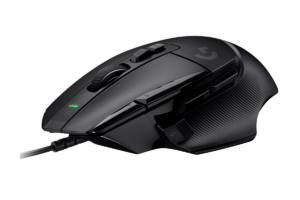
If I had to recommend one wired mouse to someone who didn’t give me any other information, I’d start with the Logitech G502 X.
- It’s not the lightest
- It’s not the cheapest
- It’s not designed exclusively for competitive FPS.
Instead, it’s a really good do-everything gaming mouse.
The G502 X uses Logitech’s HERO 25K sensor, weighs about 89 grams, includes 13 programmable controls and uses Logitech’s LIGHTFORCE hybrid optical-mechanical switches.
Why I Like It
- HERO 25K sensor
- 13 programmable controls
- Comfortable right-handed shape
- LIGHTFORCE switches
- Works across a bunch of game genres
- Doesn’t require charging
- Strong reputation as a wired all-rounder
And this is where wired starts making sense to me.
There’s also a wireless G502 X lineup.
If you don’t care about the cable and the wired model saves you a decent chunk of money?
Keep the money.
I wouldn’t pay more for wireless because somebody told me wireless is “better.”
I’d pay more because I personally hate another cable being on my desk.
If you don’t?
Problem solved.
Find it here: Check the Logitech G502 X on Amazon
Best Wired Gaming Mouse Under $30: Logitech G203 LIGHTSYNC
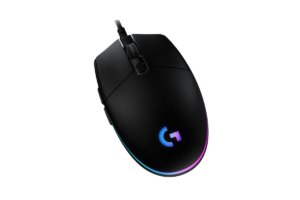
This might be one of the easiest recommendations in the entire article.
The Logitech G203 LIGHTSYNC has been around forever, it’s regularly available around the $20–$30 range, and it gives you an 8,000 DPI sensor, six programmable buttons and LIGHTSYNC RGB.
Why I Like It
- Usually very inexpensive
- 8,000 DPI sensor
- Six programmable buttons
- RGB
- Logitech G HUB support
- Proven design
- Enough mouse for a lot of casual gamers
This is exactly why wired mice are still relevant.
You can spend around $25 and get an actual gaming mouse from a major brand.
My current wireless Logitech M510 isn’t even a gaming mouse. It was cheap, it works, and I’ve kept using it.
So I’m definitely not going to tell someone starting a gaming setup that they need to spend $100+ on a mouse.
If you’ve got $25?
This is where I’d start.
Get it here: Check the Logitech G203 LIGHTSYNC on Amazon
Best Wired Mouse for FPS: Endgame Gear OP1 8K v2
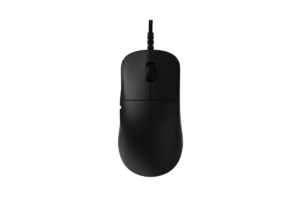
Here’s where we start getting much more specialized.
The Endgame Gear OP1 8K v2 is for someone who actually cares about competitive mouse performance.
The original OP1 8K already pushed an 8,000Hz polling rate, meaning it could report its position to your PC up to 8,000 times per second.
More importantly, this isn’t just me finding a mouse with “8K” printed on the box and deciding it must be good for FPS.
Why I Like It
- Built specifically around performance
- 8,000Hz polling
- Lightweight design
- Excellent current testing for FPS
- Doesn’t waste the design on a million extra buttons
Who I’d Buy It For
Someone playing games like:
Counter-Strike 2, Valorant, The Finals, Call of Duty, Apex Legends or anything else where fast mouse movement and accurate aiming are the priority.
Would I need an 8,000Hz gaming mouse?
Absolutely not.
Would I still want to see what it feels like?
Absolutely.
But those are two very different questions.
Find it here: Check the Endgame Gear OP1 8K v2
Best All-Around Wired Gaming Mouse: SteelSeries Rival 5
Not everyone exclusively plays shooters.
I definitely don’t.
- One day I’m playing The Finals
- Then I’m playing Resident Evil
- Then Detroit: Become Human
- Then something completely different
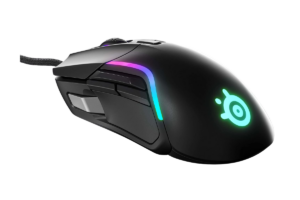
For someone bouncing between genres, I like the idea behind the SteelSeries Rival 5.
It’s designed as a multi-genre mouse with nine programmable buttons, while still avoiding the giant side-button grid you get from an MMO mouse.
Why I Like It
- Nine programmable buttons
- More controls without becoming an MMO mouse
- Ergonomic right-handed design
- Designed around multiple game genres
- Good middle ground between simple FPS mice and button-heavy MMO mice
This is what I mean by all-around.
You don’t need 17 buttons.
You don’t necessarily need an ultra-light shell.
You just need enough flexibility that switching games doesn’t make you wish you’d bought something else.
Get it here: Check the SteelSeries Rival 5
Best Wired MMO Mouse: Corsair Scimitar RGB Elite
Okay.
Now you can have all the buttons.
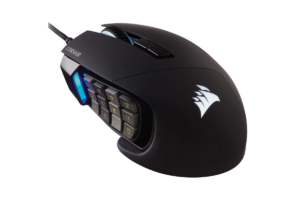
The Corsair Scimitar RGB Elite has 17 programmable buttons, including a 12-button side panel.
That’s insane for the games I normally play.
For an MMO player?
That’s kind of the point.
Why I Like It
- 17 programmable buttons
- 12-button side panel
- Adjustable side-button positioning
- 18,000 DPI sensor
- Designed specifically for MMO/MOBA-style control
- Tons of macro potential
If you play games where you’re constantly reaching for abilities, spells, items or macros, putting more of those controls directly under your thumb can be legitimately useful.
If you play mostly FPS and story games?
This is probably overkill.
Buy for your games, not because the mouse with the most buttons looks like the most impressive one.
Find it here: Check the Corsair Scimitar RGB Elite
Best High-Polling-Rate Wired Mouse: Razer DeathAdder V3
If the OP1 8K v2 is our FPS specialist, I wanted this category to answer a slightly different question:
What if you specifically want an 8,000Hz wired mouse from one of the major gaming brands?
That’s where the Razer DeathAdder V3 comes in.
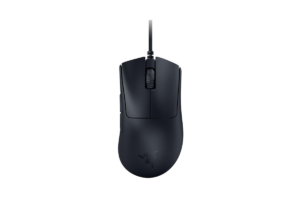
The wired DeathAdder V3 supports a native 8,000Hz polling rate, paired with Razer’s Focus Pro optical sensor and a lightweight ergonomic body.
And I want to put polling rate into perspective.
A standard 1,000Hz gaming mouse reports to the computer up to 1,000 times per second.
8,000Hz?
Up to 8,000 times per second.
Does that mean buying an 8K mouse is suddenly going to make you good?
Unfortunately, no.
Otherwise, I’d be ordering one immediately.
But if you’re building a high-refresh competitive setup and specifically want that level of input performance, this is the type of mouse I’d be looking at.
Get it here: Check the Razer DeathAdder V3
Best Lightweight Wired Gaming Mouse: Razer Cobra
I was careful with this category because I don’t want to recommend a lightweight mouse just because it’s light.
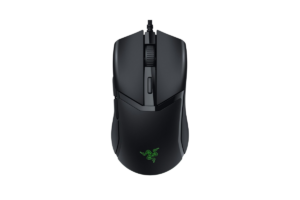
The Razer Cobra weighs only 58 grams, while still giving you Gen-3 optical switches, programmable controls and Chroma RGB.
Why I Like It
- 58 grams
- Optical switches
- RGB
- Simple shape
- Relatively affordable
- Doesn’t require jumping into premium-mouse pricing to get something lightweight
Going from a heavy traditional mouse to something around 58 grams is going to be a pretty noticeable difference.
Whether that’s a good difference comes down to you.
Some people love extremely light mice.
Others like having something more substantial in their hand.
Neither person is wrong.
Find it here: Check the Razer Cobra
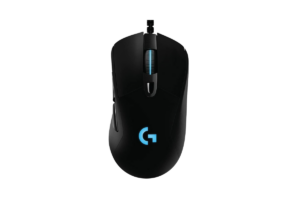
Best Wired Gaming Mouse for Comfort: Logitech G403 HERO
Specs aren’t everything.
You can have the greatest sensor ever created, but if your hand hurts after two hours?
I don’t want the mouse.
That’s why I wanted one category focused primarily on a more traditional ergonomic gaming-mouse shape.
The Logitech G403 HERO combines Logitech’s HERO sensor with a contoured right-handed body, rubber side grips and removable weight.
Why I Like It
- Ergonomic right-handed shape
- Rubber side grips
- HERO sensor
- Six programmable buttons
- Optional removable weight
- Straightforward design
This isn’t the mouse I’d pick because it has the craziest spec sheet.
That’s not the category.
I’d look at this if your first question is:
“What can I comfortably use for hours?”
Just remember that mouse comfort is extremely personal.
Hand size and grip style matter.
Get it here: Check the Logitech G403 HERO
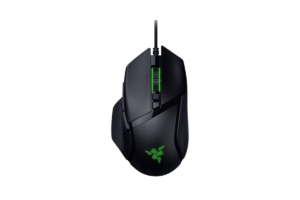
Best Wired Mouse for Gaming + Productivity: Razer Basilisk V3 35K
This is probably one of the most interesting categories for people who use the same PC for everything.
- Gaming
- Work
- Editing
- Blogging
- Browsing
- Whatever else
The Razer Basilisk V3 35K gives you an ergonomic design, programmable controls and Razer’s HyperScroll tilt wheel with multiple scrolling modes.
Why I Like It
- Comfortable ergonomic design
- Lots of programmable controls
- Versatile scroll wheel
- Strong gaming sensor
- Useful outside gaming
- Doesn’t force you to own separate work and gaming mice
The scroll wheel is what makes this one particularly interesting for productivity.
If you’re scrolling through huge web pages, documents, timelines or anything else all day, free scrolling can actually be useful.
Then you can go straight back to gaming.
Find it here: Check the Razer Basilisk V3 35K
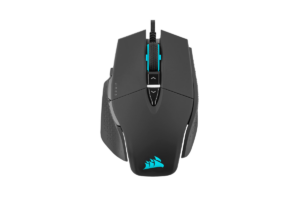
Premium Wired Pick: Corsair M65 RGB Ultra
I’m using “premium” a little differently here.
Because wired mice don’t necessarily require you to spend $150–$200 anymore.
The Corsair M65 RGB Ultra gives you a 26,000 DPI sensor, optical switches, an aluminum frame, adjustable weight and additional features like tilt gestures.
Why It Made My List
- Aluminum frame
- 26,000 DPI sensor
- Optical switches
- Adjustable weight
- Premium build
- FPS-oriented design
This is for someone who specifically wants a more substantial, feature-heavy wired mouse rather than chasing the lightest possible design.
Would I spend premium money on a wired mouse personally?
Probably not.
At a certain point I’d start looking at wireless options instead.
But that’s my preference.
If you actively prefer wired and want something nicer?
There’s no reason you have to buy wireless just because you’re spending more.
Get it here: Check the Corsair M65 RGB Ultra
Are Wired Gaming Mice Still Worth It in 2026?
Absolutely.
Just not for the reason you might have heard ten years ago.
You don’t need to buy wired because wireless gaming mice are horribly laggy.
That’s outdated.
The argument for wired is much simpler now:
- They’re cheaper
- They never need charging
- There’s no battery to worry about
- You don’t need a wireless receiver
And you can sometimes get better hardware for your money because you aren’t paying for the wireless technology.
That’s enough.
Wired vs. Wireless Gaming Mouse: Which Would I Buy?
Wireless.
But here’s the important part:
You don’t have to agree with me.
For me, wireless is worth somewhere around an extra $20–$30.
- My desk already has enough cables
- I don’t mind charging things
- I’m pretty good about putting my devices on the charger when I’m finished using them
- And I’m not competing professionally where I’m trying to squeeze every possible advantage out of my setup
If that sounds like you too, check out my Best Wireless Gaming Mice in 2026 instead.

But maybe you’re looking at:
Wired mouse: $50
vs
Wireless version: $80
And you’re thinking:
“Why would I spend another $30? I don’t care about the cable.”
Don’t.
That’s $30 you can put somewhere else in your setup.
Which Wired Gaming Mouse Would I Recommend?
- For most people?
Logitech G502 X - Competitive FPS?
Endgame Gear OP1 8K v2 - Tight budget?
Logitech G203 - MMO?
Corsair Scimitar RGB Elite - Want something really light?
Razer Cobra
That’s exactly why I don’t think there is one universal “best gaming mouse.”
The best mouse is the one that makes sense for how you play.
And if you aren’t even sure whether you want wired or wireless yet, start with my 10 Best Gaming Mice for Every Type of Gamer before narrowing it down.