
Updated November 2026
Rainbow Six Siege is one of those games where hearing something half a second earlier can completely change a round.
- A footstep behind a wall
- Someone reloading in the next room
- A defender rotating upstairs while you’re trying to push site
Sometimes the difference between winning and losing a gunfight isn’t your aim. It’s whether you heard the other player coming.
But here’s my question: Do you really need a $250 gaming headset to hear footsteps in Rainbow Six Siege?
For this guide, I wanted to look beyond flashy marketing, expensive features, and whatever headset happens to be popular.
We’re looking at what actually matters for Siege players:
- Directional audio
- Sound separation
- Comfort
- Communication
- And value
And yes, we’re including IEMs. Because depending on your setup, they might be a smarter purchase than another gaming headset.
Disclosure: This article may contain affiliate links. If you purchase through these links, I may earn a commission at no additional cost to you.

Quick Picks: Best Audio Gear for Rainbow Six Siege in 2026
Don’t feel like reading the entire guide? Here are the options I’d put on your shortlist.
- Best Competitive Wireless Headset: Razer BlackShark V3 Pro
- Best Competitive IEM: Sony INZONE E9
- Best Value IEM: SIMGOT EW300
- Best Traditional Wired Headset: HyperX Cloud III
- Best Open-Back Headphone: Sennheiser HD 560S
- Best Alternative Wireless Headset: Razer BlackShark V2 Pro
These aren’t ranked from most expensive to least expensive, and I’m not suggesting the first product will automatically make you a better Siege player. Each one makes sense for a different type of setup.
Best Competitive Wireless for R6 Siege: Razer BlackShark V3 Pro
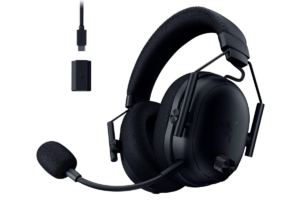
If you want a premium wireless gaming headset built specifically with competitive players in mind, the Razer BlackShark V3 Pro is one of the strongest options to consider.
It’s also one of the most popular individual headset models among the professional Rainbow Six Siege players.
That doesn’t automatically make it the best. Professional players have preferences, sponsorship arrangements, and different equipment requirements.
But it’s worth paying attention when a headset has both competitive adoption and strong independent testing behind it.
Why It’s Good for Rainbow Six Siege
The BlackShark V3 Pro focuses on several things that matter in Siege.
First, it uses a low-latency wireless connection. That’s important because you don’t want audio delays interfering with the timing of footsteps, gunfire, or other information.
Second, it offers customizable EQ settings, which give players more control over how different sounds are presented.
Third, it includes active noise cancellation. If you’re playing somewhere with a television running, people talking, or other background noise, that could be genuinely useful.
The headset also includes a detachable microphone, making it a complete solution for players who don’t have a dedicated mic.
What I Like
- Low-latency wireless connectivity.
- Competitive-focused audio features.
- Active noise cancellation.
- Detachable microphone.
- Customizable audio settings.
What I Don’t Like
The price.
You’re paying for a premium package, and not every feature will improve your ability to hear enemies.
If you’re playing in a quiet room with a good wired headset or IEMs, you might not need active noise cancellation or all the wireless features.
Independent testing has also identified fit concerns and some treble distortion, so it’s not a flawless product.
My verdict: The BlackShark V3 Pro is my premium wireless recommendation for competitive Siege players, but I wouldn’t tell someone with an already-good audio setup to rush out and replace it.
Get them here: Check Razer BlackShark V3 Pro price on Amazon
Best Competitive IEM for R6 Siege: Sony INZONE E9
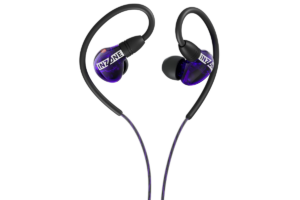
The Sony INZONE E9 isn’t a traditional gaming headset. It’s a pair of wired in-ear monitors designed with competitive FPS gaming in mind.
And unlike many gaming products that promise to make every explosion sound enormous, the E9 takes a more focused approach.
It’s designed to help important sounds remain distinguishable when a lot is happening at once.
Why That Matters in Siege
Think about a typical Siege round.
- Your teammate is shooting through a barricade.
- Someone sets off an explosive.
- You’re holding an angle, trying to listen for a defender rotating into position.
The problem isn’t necessarily that footsteps are too quiet.
It’s that several sounds are competing for your attention.
The INZONE E9 has received strong independent reviews for its separation, passive noise isolation, and competitive-focused tuning.
That’s particularly relevant to Siege, where identifying useful audio information can be more important than making everything sound cinematic.
What I Like
- Competitive FPS-focused tuning.
- Strong sound separation in independent testing.
- Excellent passive isolation.
- Lightweight in-ear design.
- Included USB-C audio adapter.
- Multiple ear tip options.
What I Don’t Like
These aren’t necessarily the IEMs I’d choose for someone who plays a little bit of everything.
Independent reviewers have described their sound as less exciting for music, movies, and immersive single-player games.
And at their typical $150 retail price, they’re considerably more expensive than many budget IEMs.
They also don’t replace a headset microphone.
My verdict: If competitive FPS performance is your priority and you already have a microphone, the INZONE E9 deserves serious consideration. It’s one of the most compelling purpose-built gaming IEMs available.
Find them here: Check Sony INZONE E9 price on Amazon
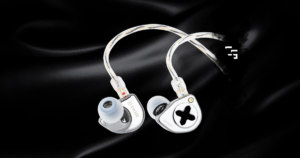
Best Value IEM for R6 Siege: SIMGOT EW300
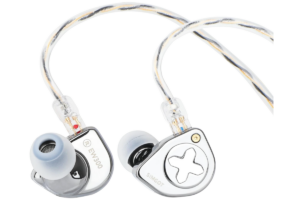
Now we’re talking about something I actually own and use.
I switched from my HyperX Cloud III Wireless to the SIMGOT EW300, and I genuinely love these things for the money.
But here’s something important.
I didn’t switch because my HyperX headset was terrible. I switched because I wear glasses.
After long gaming sessions, the HyperX earcups would push the arms of my glasses against the sides of my head.
It got uncomfortable.
And when you’re gaming for hours, comfort matters more than people give it credit for.
My Experience With the EW300
The biggest improvement was immediate.
- No bulky headset pressing against my glasses.
- No hot ears.
- No heavy headband sitting on my head for hours.
The EW300s were lightweight, comfortable, and sounded excellent.
I also noticed more bass than I was used to with my HyperX Cloud III Wireless, while the overall sound felt clean and detailed.
I felt the EW300 and Cloud III Wireless were roughly comparable for directional awareness, while the EW300 was much more comfortable for me.
Check out my SIMGOT EW300 Review: Are Gaming IEMs Better With Glasses?
What I Like
- Excellent comfort, especially with glasses.
- Clean, detailed audio.
- Strong value around its original $80 price point.
- Lightweight design.
- No headset-related heat or pressure.
- Good directional awareness in my experience after correcting the cable connections.
What I Don’t Like
The included cable is short for some desktop setups.
These also have no built-in microphone, so you’ll need another way to communicate with teammates.
And although I enjoy the EW300s, I haven’t conducted controlled testing showing they’re more accurate than dedicated competitive headsets.
My verdict: If you already have a microphone and want comfortable, good-sounding audio without spending a fortune, the SIMGOT EW300 is one of my favorite value recommendations.
Get them here: Check SIMGOT EW300 price on Amazon
Best Traditional Wired for R6 Siege: HyperX Cloud III Wired
Not everyone wants IEMs.
Some people don’t like having something inside their ears. Others want a single device that handles both game audio and voice chat.
And that’s completely reasonable.
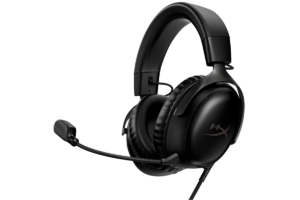
The HyperX Cloud III Wired is a straightforward choice for those players.
Why It’s Worth Considering
The Cloud III offers a conventional closed-back gaming headset design with a detachable microphone and wired connectivity.
That makes it a practical option for someone who wants to plug in, join a match, and start playing without worrying about battery life.
It’s also worth remembering that a good gaming headset doesn’t need dozens of special features to be useful.
For Siege, a comfortable fit, understandable directional cues, and clear teammate communication are the essentials.
What I Like
- Wired connection without battery concerns.
- Integrated detachable microphone.
- Traditional over-ear design.
- Practical all-in-one gaming setup.
- Generally more affordable than premium wireless alternatives.
What I Don’t Like
You still have to deal with a full-size headset.
For players who wear glasses, that could mean pressure around the temples, depending on the fit.
And although I previously owned the Cloud III Wireless, I haven’t personally tested the wired version. My experience with the wireless model shouldn’t be treated as a direct review of this one.
My verdict: The Cloud III Wired makes sense for players who want an uncomplicated gaming headset with a microphone. You don’t necessarily need to spend hundreds of dollars to get useful competitive audio.
Find them here: Check HyperX Cloud 3 Wired price on Amazon
Best Open-Back Headphones: Sennheiser HD 560S
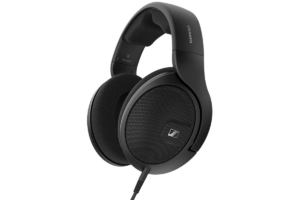
The Sennheiser HD 560S isn’t marketed as an esports gaming headset.
It’s a pair of open-back headphones designed for detailed listening.
But that doesn’t mean it should be ignored for gaming.
Why Open-Back Headphones Are Interesting
Open-back headphones allow more air and sound to pass through the earcups.
This can create a more open listening presentation than some closed-back designs.
For certain players, that presentation feels more natural and makes it easier to distinguish sounds within a game.
However, an open-back design doesn’t automatically provide better positional accuracy. The headphone’s tuning, fit, and the game’s audio processing still matter.
The HD 560S is worth considering for PC players who want headphones for gaming, music, and general listening.
What I Like
- Detailed, relatively neutral sound.
- Open-back presentation.
- Useful beyond gaming.
- No battery or wireless charging requirements.
What I Don’t Like
These headphones provide very little isolation from outside noise.
If you’re gaming around other people, watching television in the same room, or dealing with a noisy environment, that could become distracting.
They also leak sound and don’t include a gaming microphone.
My verdict: The HD 560S is an interesting choice for someone with a quiet gaming room and a separate microphone. I wouldn’t recommend it over a closed-back headset or IEM for everyone, especially if blocking external noise matters.
Get them here: Check Sennheiser HD 560S price on Amazon
Best Older Premium Alternative: Razer BlackShark V2 Pro (2023)
The newer model isn’t always the smartest purchase.
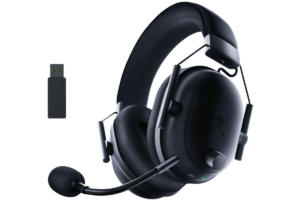
The Razer BlackShark V2 Pro (2023) is still worth considering if you find it at a meaningful discount.
It offers low-latency wireless gaming audio, a strong microphone, and competitive-focused features without requiring you to purchase the newest flagship.
Why It’s Still Relevant
The V2 Pro has been used by competitive Siege players and received favorable reviews for its wireless performance and microphone quality.
It also provides EQ customization, which can be useful for tailoring the listening experience.
What makes it interesting isn’t that it’s automatically better than the V3 Pro.
It’s that the price difference might be substantial enough to make the older model the better value.
What I Like
- Competitive-oriented wireless audio.
- Strong microphone reputation.
- Good battery life.
- EQ customization.
- Potential discounts compared with the newer model.
What I Don’t Like
The sound may benefit from EQ adjustments, and some reviewers have reported software frustrations.
You’re also giving up some of the newer model’s features, including active noise cancellation.
My verdict: If the V2 Pro is considerably cheaper than the V3 Pro, it’s worth comparing. If their prices are close, I’d lean toward the newer model.
Find them here: Check Razer BlackShark V2 Pro price on Amazon
Are IEMs Better Than Headsets for Rainbow Six Siege?
The answer isn’t as simple as saying IEMs are better or headsets are better.
Both can work extremely well.
The differences come down to the specific equipment, your environment, and what you find comfortable.
When IEMs Make More Sense
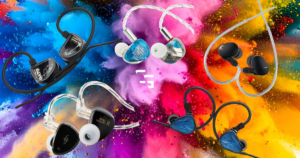
IEMs are especially appealing if you wear glasses, dislike bulky headsets, or already own a dedicated microphone.
They can also provide excellent passive noise isolation when fitted properly.
And because there are good IEMs at relatively affordable prices, you don’t necessarily have to spend a fortune to get detailed audio.
But they aren’t perfect.
Some people find in-ear designs uncomfortable, fit can change the sound significantly, and most traditional IEMs don’t include a microphone.
Dont miss out on the Best Gaming IEMs in 2026
When Gaming Headsets Make More Sense
Gaming headsets are convenient.
You get audio and communication in one device, and many wireless models allow you to move around without being attached to your desk.
They can also be a better choice if you dislike having something inside your ears.
For some players, the simplicity of putting on a headset and joining Discord is worth paying for.
Which Would I Choose?
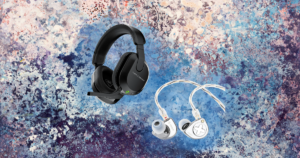
For my own setup, I’m sticking with my SIMGOT EW300s.
I already have a dedicated microphone, I wear glasses, and I prefer the comfort.
But if I were starting from scratch without a microphone, I’d seriously consider a traditional gaming headset.
And if my only priority were competitive FPS audio, I’d take a closer look at purpose-built options like the Sony INZONE E9.
The best choice depends on what you need, not which category is more popular.
Still trying to decide? I wrote about Gaming Headsets vs. IEMs: Which is Better in 2026?
What Actually Matters for Hearing Footsteps in Rainbow Six Siege?
Before spending money on new audio equipment, there are a few things worth understanding.
1. Sound Separation Matters More Than Massive Bass
A headset can sound incredible when explosions are going off and still be frustrating in a competitive shooter.
Why?
Because loud, bass-heavy effects can make quieter information harder to distinguish.
For Siege, I want to hear footsteps, reloads, movement, and environmental interactions without everything blending together.
That doesn’t mean bass is bad.
It means more bass isn’t automatically better.
2. Directional Audio Isn’t Just About Your Headset
Siege’s sound system is complicated.
Sounds can travel through openings and interact with the environment in ways that don’t always match what you’re seeing.
That’s particularly noticeable when trying to determine whether someone is above or below you.
A better headset may help you distinguish certain details, but it won’t eliminate every confusing audio situation.
Map knowledge and understanding how sound travels are important, too.
3. Comfort Is a Competitive Feature
Nobody talks about this enough.
If your headset starts hurting after an hour, that’s going to affect your experience.
- Maybe you’re constantly adjusting it.
- Maybe your ears get hot.
- Maybe your glasses are being pushed into your head.
Whatever the problem, it’s distracting.
That was the biggest reason I switched to IEMs, and I don’t regret it.
4. You Don’t Need the Most Expensive Audio Setup
There’s a point where spending more money starts buying convenience, features, build quality, and versatility rather than a clear competitive advantage.
Wireless connectivity, active noise cancellation, premium materials, and advanced software can all be worthwhile.
But they aren’t necessary for everyone.
If you’re already hearing enemies clearly with a reasonably priced headset, upgrading to something twice as expensive might not change your performance.
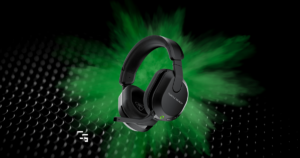
Check out the Best Gaming Headsets Under $100 in 2026
5. Your Microphone Matters, Too
Siege is a team game.
Hearing an enemy is useful, but communicating that information to your teammates is just as important.
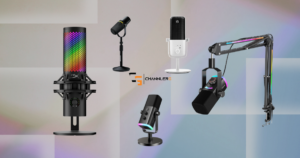
If you’re buying IEMs, remember to factor in the cost of a microphone if you don’t already have one.
A $100 pair of IEMs isn’t necessarily a $100 complete gaming audio setup.
I’ve made a list of the Best Gaming & Streaming Microphones in 2026
Final Verdict: What Would I Buy for Rainbow Six Siege?
If I were buying audio equipment specifically for Rainbow Six Siege today, I wouldn’t automatically choose the most expensive headset.
I’d start by looking at my setup.
- If I wanted a premium wireless headset with a microphone and competitive-focused features, the Razer BlackShark V3 Pro.
- If I already had a microphone and wanted an IEM specifically focused on competitive FPS gaming, the Sony INZONE E9.
- If I wanted good audio, excellent comfort, and strong value without spending a fortune, the SIMGOT EW300.
- And if I just wanted a traditional headset that handled everything without a complicated setup, the HyperX Cloud III Wired.
Rainbow Six Siege rewards awareness, communication, and understanding what’s happening around you.
Good audio equipment helps you access that information.
But no headset is going to replace map knowledge, positioning, or learning how to interpret the sounds you’re hearing.
Buy the audio setup that helps you play comfortably and consistently. Not the one with the biggest price tag.