
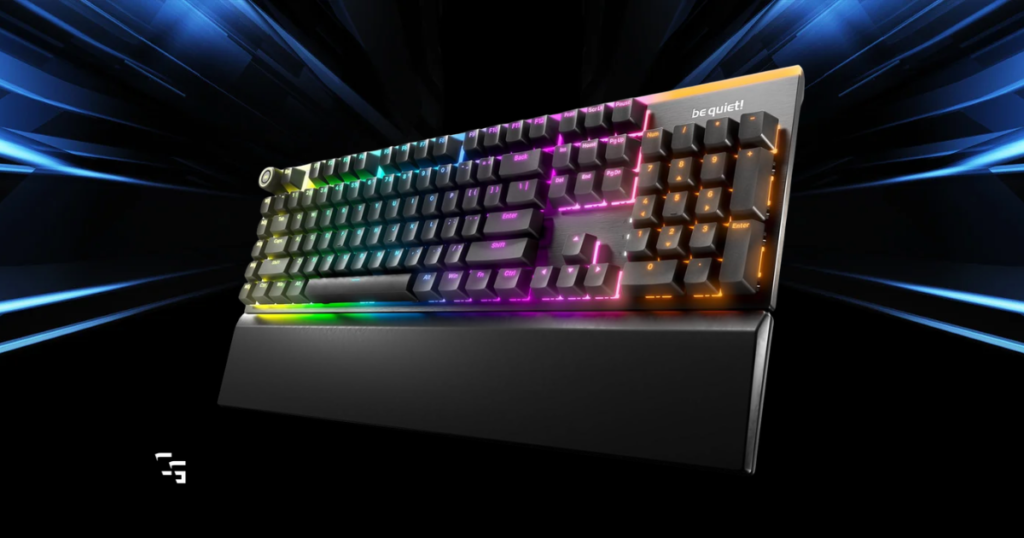
There’s something about gaming when the rest of the house is asleep.
- No interruptions
- No distractions
- And nobody asking you to do something right when you’re in the middle of a match
But there’s one problem.
Some mechanical keyboards sound like you’re typing on a bag of LEGOs.
I stream early in the morning, usually while my family is still asleep, so I understand why a quieter gaming setup matters. I don’t need my keyboard announcing to the entire house that I just lost another gunfight.
My current keyboard is a SteelSeries Apex 3, which uses membrane switches. It’s been perfectly fine for my gaming and streaming setup, but I’ve been curious about quieter mechanical alternatives.
For the five keyboards below, I compared their:
- Switch options
- Sound-dampening construction
- Gaming features
- And what makes each one worth considering
If you’re trying to game without waking everybody up, these are five mechanical keyboards I’d put on your shopping list.
This article contains affiliate links. If you purchase through one of my links, I may earn a commission at no additional cost to you.

Quick Verdict: Which Quiet Mechanical Keyboard Should You Buy?
If I were buying a quiet mechanical keyboard today, here’s how I’d narrow it down.
- Best Overall: be quiet! Light Mount
- Best for Competitive FPS: be quiet! Light Mount TKL
- Best Traditional Mechanical Keyboard: Ducky One 3 with Cherry MX Silent Red Switches
- Best Mainstream Gaming Option: Corsair K70 CORE RGB
- Best for Customization: Keychron Q1 Max
My pick: I’d start with the be quiet! Light Mount if keeping noise down was my biggest priority.
And if you’re working with a tighter budget, check out the Best Gaming Keyboards Under $100 in 2026

Best Overall: be quiet! Light Mount
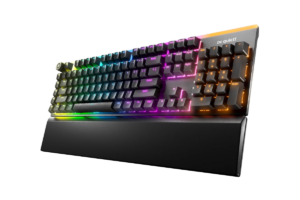
The be quiet! Light Mount is probably where I’d start if I were shopping specifically for a quiet mechanical keyboard.
And yes, the company is actually called be quiet! Which is pretty fitting for this list.
What makes this keyboard interesting is that reducing noise isn’t just an afterthought.
It uses factory-lubricated silent mechanical switches, three layers of sound-dampening material, and lubricated stabilizers.
That’s important because keyboard noise doesn’t come exclusively from the switches.
The case itself can amplify vibrations, and larger keys like the spacebar can rattle even when the rest of the keyboard is relatively quiet.
The Light Mount is designed to address those issues.
What stands out:
- Dedicated silent linear and silent tactile switch options
- Three layers of sound-dampening material
- Lubricated stabilizers
- Hot-swappable switches
- Full-size layout with RGB lighting and programmable controls
The downside: It’s a full-size wired keyboard, so it takes up more desk space than a compact alternative.
My verdict: If I wanted a quieter mechanical keyboard without researching replacement switches or taking anything apart, this would be my first stop.
Get it here: Check be quiet! Light Mount Price on Amazon
Best for Competitive FPS Games: be quiet! Light Mount TKL
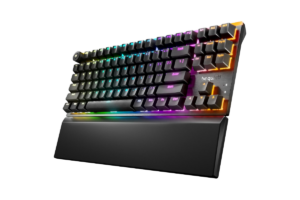
If you mainly play Rainbow Six Siege, Counter-Strike, or other competitive shooters, I’d seriously consider the TKL version instead.
TKL stands for tenkeyless, meaning the keyboard doesn’t have a number pad.
That gives you more room to move your mouse, which can be especially useful if you play with lower sensitivity.
The Light Mount TKL keeps the noise-reduction approach of the full-size model, including silent mechanical switches, sound-dampening layers, and lubricated stabilizers.
You also get hot-swappable switches if you eventually want to change the feel.
What stands out:
- Tenkeyless layout
- Silent linear or silent tactile switches
- Three layers of sound-dampening material
- Hot-swappable design
- RGB lighting and gaming controls
The downside: No number pad, which may be inconvenient if you use your PC for work as well as gaming.
My verdict: For somebody building a dedicated FPS setup, I’d probably choose this over the full-size Light Mount.
And if you’re also shopping for a mouse, check out my Best Gaming Mice for FPS Games in 2026

Find it here: Check be quiet! Light Mount TKL Price on Amazon
Best Traditional Mechanical Keyboard: Ducky One 3
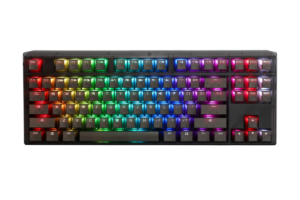
Ducky is a familiar name among mechanical keyboard enthusiasts, and the One 3 is an interesting option for people who want a more traditional design.
But there’s one thing I’d pay very close attention to when shopping.
Make sure you’re getting the Cherry MX Silent Red version.
The Ducky One 3 has been sold with different switches, and they don’t all produce the same amount of noise.
Cherry MX Silent Red switches are linear switches with internal damping designed to reduce noise when the keys bottom out and return.
The One 3 also uses sound-dampening material inside the case and lubricated stabilizers.
That combination is much more relevant to quiet gaming than simply choosing a keyboard advertised as having smooth switches.
What stands out:
- Cherry MX Silent Red switch configurations
- Hot-swappable switch sockets
- PBT keycaps
- Internal sound-dampening material
- Lubricated stabilizers
The downside: Finding the exact switch configuration may be difficult, and pricing can vary considerably.
My verdict: I’d consider this if I wanted a traditional mechanical keyboard and could find the Silent Red version at a reasonable price.
Get it here: Check Ducky One 3 Silent Red Price on Amazon
Best Mainstream Gaming Option: Corsair K70 CORE RGB
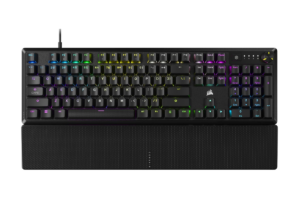
Corsair makes some popular gaming keyboards, and the K70 CORE RGB takes a different approach to noise reduction.
Rather than using dedicated silent switches, it combines pre-lubricated Corsair MLX Red linear switches with two layers of sound-dampening material.
Linear switches aren’t automatically silent.
A standard linear switch can still make noise when you press it all the way down.
What Corsair is doing here is reducing unwanted resonance and improving the overall typing sound.
For someone who wants a traditional gaming keyboard that doesn’t sound as hollow or harsh as some alternatives, that’s worth considering.
You also get RGB lighting, a media control dial, and Corsair’s iCUE customization software.
What stands out:
- Pre-lubricated MLX Red linear switches
- Two layers of sound dampening
- Full-size gaming layout
- RGB lighting
- Media control dial
The downside: These aren’t dedicated silent switches. If making the least possible noise is your main goal, I’d prioritize one of the first three keyboards.
My verdict: A solid option for someone who wants a recognizable gaming keyboard with noise-conscious construction, rather than a specialized silent model.
Find it here: Check Corsair K70 CORE RGB Price on Amazon
Best for Customization: Keychron Q1 Max
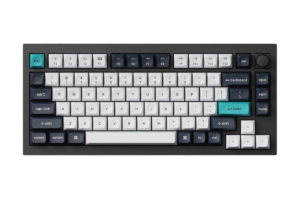
The Keychron Q1 Max is a little different from everything else on this list.
I wouldn’t call it the quietest keyboard straight out of the box.
But it gives you more control over how your keyboard feels and sounds.
The Q1 Max uses a double-gasket design, acoustic material inside the case, and a hot-swappable PCB.
That means you can replace its mechanical switches without soldering, as long as you choose compatible replacements.
If I were buying one specifically for quiet gaming, I’d look into installing dedicated silent linear switches.
That would give me the benefit of a well-dampened keyboard case along with switches designed to reduce keypress noise.
The Q1 Max also supports wired and 2.4GHz wireless connectivity, which is useful for gaming.
What stands out:
- Hot-swappable mechanical switches
- Double-gasket construction
- Internal acoustic material
- Aluminum case
- Wired and 2.4GHz wireless connectivity
The downside: It’s a more expensive route, particularly if you’re buying replacement silent switches separately.
My verdict: I’d choose this if I enjoyed customizing hardware. If I just wanted something quiet without extra work, I’d buy a keyboard with silent switches already installed.
Get it here: Check Keychron Q1 Max Price on Amazon
For a broader look at keyboards beyond noise reduction, I also covered Top 5 Gaming Keyboards Worth Your Desk Space
What Actually Makes a Mechanical Keyboard Quiet?
Here’s where I think a lot of people get confused when shopping for gaming keyboards.
Just because a keyboard doesn’t have clicky switches doesn’t mean it’s going to be quiet.
There are three main things I’d look for.
1. Dedicated Silent Switches
Mechanical switches generally fall into three categories.
- Clicky switches intentionally make an audible clicking sound.
- Tactile switches provide a noticeable bump when you press them.
- Linear switches move smoothly without that tactile bump.
But none of those categories automatically guarantees a quiet keyboard.
Dedicated silent switches typically use internal damping to reduce the impact noise from keypresses.
That’s why I’d pay more attention to the actual switch model than whether a keyboard is advertised as mechanical or linear.
I’ve explored the broader differences in Mechanical vs. Membrane Keyboards: Does It Matter for Gaming?
2. Sound-Dampening Material
Some keyboards sound louder because their cases amplify vibrations.
You press a key, and the sound resonates through the keyboard.
Manufacturers can reduce that effect by adding foam, silicone, or other damping materials inside the case.
A gasket-mounted design can also change how vibrations travel through the keyboard.
These features don’t eliminate switch noise, but they can help control unwanted resonance.
3. Stabilizers and Larger Keys
Ever notice how the spacebar sometimes sounds much louder than every other key?
That’s because larger keys use stabilizers to keep them moving evenly.
If those stabilizers rattle, your keyboard can sound noisy even with relatively quiet switches.
Lubricated and properly tuned stabilizers help reduce that problem.
For late-night gaming, I’d pay attention to all three factors instead of focusing on one specification.
Do Mechanical Keyboards Actually Make You Better at Gaming?
I play shooters, story-driven games, and stream regularly.
I’m not sitting here convinced that buying an expensive mechanical keyboard is suddenly going to make me a professional Rainbow Six Siege player.
Mechanical keyboards can offer advantages in switch feel, consistency, durability, and customization.
But they aren’t a requirement for competitive gaming.
And if you already have a quiet keyboard that works, replacing it might not accomplish much.
I think people sometimes spend too much time worrying about their equipment and not enough time figuring out what actually works for them.
The same applies to choosing between keyboard and controller.
I’ve talked about that in Keyboard vs Controller: Does It Matter (or Are We Just Bad?)
Are Quiet Mechanical Keyboards Worth the Money?
I think they can be, but only if keyboard noise is actually a problem for you.
If you’re:
- Gaming late at night in a shared room
- Recording commentary
- Or working near other people
…a quieter keyboard can make your setup more comfortable.
But if you already have a keyboard that doesn’t bother anyone, I’m not sure spending another $150 or more is going to change your gaming experience.
I don’t think every piece of gaming equipment needs to be expensive.
Sometimes the best upgrade is the one that solves a problem you’ve actually noticed.
That’s something I’ve talked about in My Gaming Setup Isn’t Impressive (And That’s Why It Works)

My Final Verdict: Which Quiet Mechanical Keyboard Would I Buy?
If I were buying a mechanical keyboard specifically for late-night gaming, I’d start with the be quiet! Light Mount.
It has dedicated silent switches, multiple layers of sound dampening, and a full-size layout.
For competitive FPS games, I’d lean toward the Light Mount TKL because of the extra mouse space.
If I wanted a more traditional mechanical keyboard, I’d consider the Ducky One 3 with Cherry MX Silent Red switches, assuming I could find the right configuration at a reasonable price.
And if I wanted to experiment with different switches and customize everything, the Keychron Q1 Max would be the most interesting option.
But I’m also not in a hurry to replace my SteelSeries Apex 3.
It works for my gaming setup, and I don’t need a new keyboard just for the sake of having something new.
My advice? Buy a quieter mechanical keyboard because you need a quieter keyboard, not because somebody convinced you that mechanical automatically means better.
Your family, roommates, or whoever happens to be sleeping nearby will probably appreciate that decision a lot more than they appreciate your RGB lighting.