
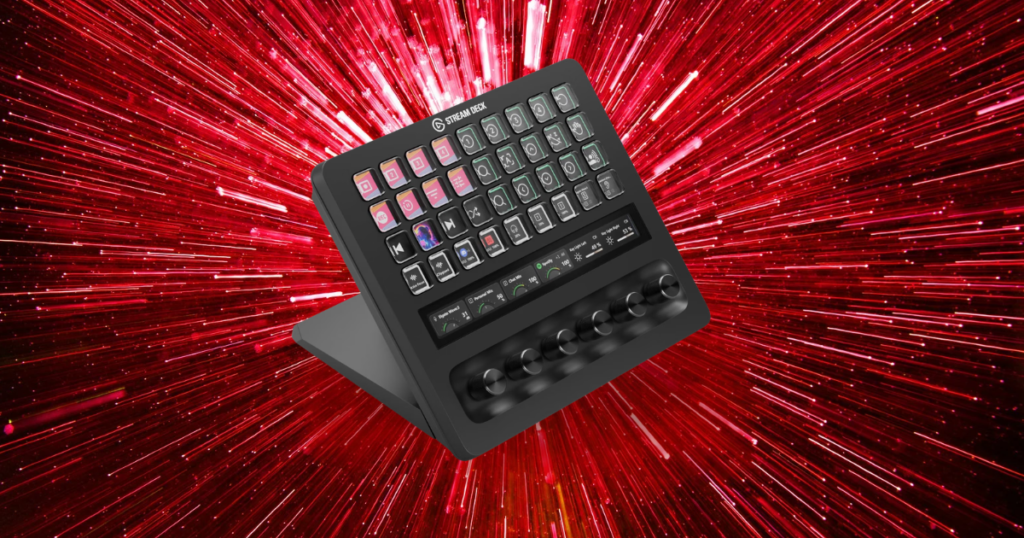
I bought my Stream Deck because I wanted to make stupid noises.
Seriously.
- I had gotten comfortable streaming.
- I was playing ARC Raiders pretty much every day.
- I was talking to chat more.
- & I thought adding sound effects would be another fun layer to the stream.
More than six months later, I barely use the sound effects.
Instead, the thing I probably use my Stream Deck for more than anything else is changing OBS scenes.
Very exciting stuff.
But after using the Elgato Stream Deck MK.2 for more than six months, I understand why streamers love these things. I also know that I absolutely did not need one when I started streaming.
And if you’re just getting started, you probably don’t either.
This post contains affiliate links. If you buy something through one of these links, I may earn a commission at no additional cost to you.

TL;DR
No, you do not need a Stream Deck to stream.
I streamed without one for a long time.
You can change scenes, mute your microphone, adjust audio and control OBS perfectly fine without spending money on another piece of hardware.
But once your streaming workflow gets more complicated, a Stream Deck becomes incredibly convenient.
I use mine primarily for:
- Switching OBS scenes
- Muting and controlling audio
- Sound effects
Ironically, sound effects were the entire reason I wanted one, and now switching scenes is easily what I use it for most.
If you’re a new streamer with $150 to spend, I would not automatically spend it on a Stream Deck.
Fix your:
- Microphone
- Headphones
- Lighting
- & Whatever else is actually holding your stream back first
Once everything else works and you want to make running your stream easier?
Then I completely understand buying one.
Get it here: Check Elgato MK.2 price on Amazon
The Stream Deck Was the First Thing ChannlerG Bought Me
My Stream Deck was the first thing I bought with money I had actually made from ChannlerG.
It wasn’t some huge amount of money.
Some of it came from TikTok donations. Some came from affiliate commissions through this website.
But it was enough.
I’d been putting money, time and a ridiculous number of hours into building all of this, so being able to take some of the first money it generated and put it back into my setup felt pretty cool.
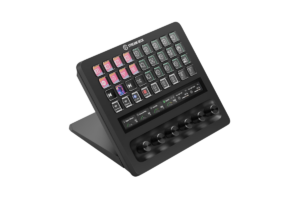
I ended up buying the Elgato Stream Deck MK.2, which gives you 15 customizable LCD buttons.
At the time, I knew exactly what I wanted to do with them.
Or at least I thought I did.
Find it here: Check Elgato Stream Deck Mini price on Amazon
I Bought It for Sound Effects
I wanted to make my streams more entertaining.
By this point, I wasn’t brand new anymore.
- I’d gotten comfortable playing ARC Raiders regularly.
- I was more comfortable talking to people in chat.
- I wasn’t spending the entire stream internally panicking about whether OBS was still running.
So naturally, the next step was apparently fart noises.
I wanted buttons I could hit when something happened in-game and immediately play a sound effect.
And the Stream Deck is great for that.
The problem?
I don’t use them nearly as much as I thought I would.
They’re still there. I still use them occasionally.
They just never became this huge part of my streams like I imagined they would.
What surprised me was how useful the boring buttons became.
Get it here: Check Elgato Stream Deck Neo price on Amazon
Switching OBS Scenes Is Easily My Favorite Feature
This is what I use my Stream Deck for constantly now.
Before owning one, if I wanted to change scenes, I clicked over to OBS and selected the scene.
That’s it.
It wasn’t some horrible experience.
I didn’t lose viewers because I had to click a mouse twice.
But it interrupts the flow.
If you’re:
- Playing a game
- Talking to chat
- & Trying to keep everything moving
…clicking over to OBS takes your attention away from what you’re doing.
Now?
- Press button.
- Scene changes.
- That’s it.
I can move between my gameplay scene and whatever else I need without digging around OBS.
The Stream Deck’s OBS integration can also control:
- Sources
- Recording
- Audio
- Streaming
- Transitions
- & more
So, you can go considerably deeper than I have.
Personally, I haven’t.
Scenes, volume, mute and some sound effects.
That’s pretty much my setup.
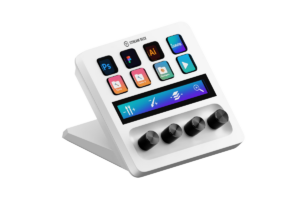
Find it here: Check White Elgato Stream Deck & Audio Mixer price on Amazon
You Absolutely Do Not Need One to Stream
This is the part I want new streamers to understand.
A Stream Deck doesn’t make you a streamer.
- It doesn’t make your microphone sound better.
- It doesn’t improve your camera.
- It doesn’t make your lighting better.
- It doesn’t make your gameplay more entertaining.
- & it definitely isn’t going to magically give you viewers.
It’s a convenience tool.
A really useful convenience tool, but still a convenience tool.
Anything I use mine for could be done another way.
Before I owned it, I clicked around OBS.
Was that slightly annoying?
Yep.
Did it work?
Also yep.
If you’re sitting there trying to build your first streaming setup and you’ve convinced yourself that you need a Stream Deck before you can hit Go Live:
You don’t.
Save your money.
Before the Stream Deck, I’d recommend the Best Gaming & Streaming Microphones in 2026
Buying One When I Started Would Have Been a Waste
When I first started streaming, I didn’t even understand what an OBS scene was.
I’m serious.
I was trying to learn:
- OBS
- Audio
- Cameras
- Streaming settings
- Overlays
- & everything else that gets thrown at you when you decide you’re going to start livestreaming.
What on earth would I have done with 15 programmable buttons?
I didn’t have a workflow to simplify yet.
That’s extremely important.
A Stream Deck makes considerably more sense after you know how you stream.
By the time I bought mine, I knew what I wanted.
- I understood my scenes.
- I understood OBS.
- I was comfortable talking while playing.
- I knew which things were annoying to click.
That’s when shortcuts became useful.
Buying one earlier would’ve just given me another piece of software to figure out while I was already figuring out everything else.
Check out my list of Best Webcams for Streaming in 2026
Setting Up the Stream Deck Was Surprisingly Easy
Thankfully, once I did buy one, setup wasn’t complicated.
The Stream Deck software is basically built around dragging actions onto buttons and configuring what you want each one to do.
There are plugins available through Elgato’s Marketplace, and the official OBS plugin lets you assign OBS functions directly to keys.
That matched my experience pretty well.
- Click.
- Drag.
- Tell the button what to do.
- Done.
By the time I bought mine, I already understood what I wanted from it, so that probably helped.
I wasn’t staring at 15 empty buttons wondering what I had just spent money on.
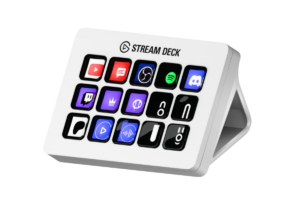
Get it here: Check White Elgato Stream Deck MK.2 price on Amazon
What I Actually Use My Stream Deck For
My setup isn’t crazy.
I’ve seen Stream Deck setups where it looks like someone is preparing to launch a SpaceX rocket.
Mine isn’t that.
OBS Scenes
This is easily number one.
It’s the feature I didn’t buy the Stream Deck for and somehow became the feature I use most.
Being able to switch scenes instantly without clicking away from the game is just nice.
Not necessary.
Nice.
Volume and Mute
Again, nothing revolutionary.
They’re just useful controls to have sitting directly in front of me.
Instead of finding whatever audio control I need on-screen, I can assign it to a physical button.
Sound Effects
The entire reason I bought the Stream Deck.
And probably the thing I use least out of the three now.
Of course.
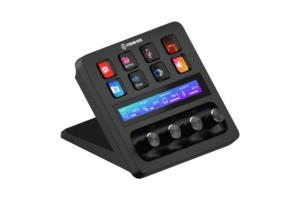
Find it here: Check Elgato Stream Deck + Audio Mixer price on Amazon
Is a Stream Deck Worth the Money?
Do I think mine is useful?
Absolutely.
Would I immediately spend another $100+ tomorrow if mine broke tonight?
No.
And that’s not because I don’t like it.
I have a wife and three kids.
A Stream Deck is not jumping to the top of the family emergency spending list because Dad suddenly has to click OBS again.
I’d replace it when we had the extra money.
That’s probably the easiest way I can explain where this device fits for me.
- I like having it.
- I’d want another one.
- I don’t need another one.
There’s a difference.
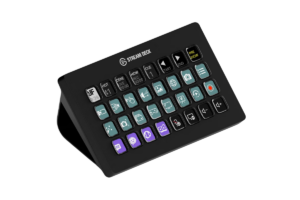
Get it here: Check Elgato Stream Deck XL Advanced price on Amazon
I’d Upgrade My Audio Before Buying One
Looking back at the order I upgraded my streaming setup, I’m actually not too upset with how I did things.
But if I could change something?
I probably would’ve put more money into my audio before buying the Stream Deck.
I’ve since upgraded to my FIFINE AM8 PRO-T microphone and SIMGOT EW300 IEMs, and I’m working on improving the audio side of my setup even more.
Those upgrades affect the actual stream.
- People hear my microphone.
- I hear the game through my IEMs.
- Audio is part of every second of every stream.
My Stream Deck?
It saves me from clicking OBS.
That’s useful, but those aren’t equal priorities.
If your microphone sounds horrible and you’re shopping for a Stream Deck, please buy the microphone first.
Your viewers don’t care how efficiently you changed scenes if you sound like you’re communicating with them through a McDonald’s drive-thru speaker.
Upgrade your audio. Check out the 5 Best Wireless Gaming Headsets in 2026
What Should You Upgrade Before a Stream Deck?
I wouldn’t make one universal upgrade order because everybody’s setup has different problems.
- If your microphone is terrible, fix your microphone.
- If you can’t comfortably hear your game, fix your headphones.
- If your webcam looks terrible because your room is dark, you might need a $30 light more than you need $150 worth of customizable buttons.
If all of those things are working?
Now we’re getting somewhere.
That’s when I’d start looking at quality-of-life upgrades.
A Stream Deck doesn’t solve a fundamental problem with your stream.
It makes an already-working stream easier to operate.
That’s why I think it makes more sense later.
Ready for an upgrade? Check out Gaming Headsets vs IEMs: Which is Better in 2026?
What If You Have $100+ to Spend?
Someone tells me:
“I’m starting streaming tomorrow. I’ve got $150. Should I buy a Stream Deck?”
My first question is:
“What do you already have?”
If you’ve got:
- Some garbage microphone
- No lighting
- Terrible headphones
- & $150 burning a hole in your pocket?
No.
Do not buy a Stream Deck.
If you’ve already got:
- Decent audio
- A setup that works
- & You’re comfortable using OBS?
It’s time.
I bought mine when I felt like I was ready to add another layer to my streams.
That’s a much better reason than:
“Every streamer on YouTube has one, so I guess I need one too.”
Check out the Best Lighting for Streaming in 2026: What You Really Need
Stream Deck Isn’t Just for Streaming
This is worth mentioning even though I personally don’t use mine this way.
The name makes it sound like this is exclusively a streaming device, but the buttons can
- Launch apps
- Trigger hotkeys
- Use plugins
- & Run other shortcuts.
Elgato’s current software supports a much broader plugin ecosystem than just OBS.
You could build workflows for:
- Editing
- Productivity
- Music
- Or other PC tasks.
I don’t.
Mine is for streaming.
I already spend enough time screwing around with my computer. I don’t need a dedicated button to open WordPress.
But if you’re someone who would use it for streaming and everyday work, that obviously makes the price easier to justify.
Get it here: Check Elgato Stream Deck XL price on Amazon
So, Do You Need a Stream Deck to Stream?
Not even a little bit.
I streamed perfectly fine without one.
If you’re just starting out, I actually think waiting is the smarter move.
- Learn OBS.
- Learn how your audio works.
- Figure out your scenes.
- Get comfortable talking to people.
- Figure out what kind of content you even want to make.
Then you’ll start noticing little things that interrupt your workflow.
- “I wish I could change this scene without clicking over there.”
- “I wish I could mute that instantly.”
- “I wish I could trigger this without screwing around with three different windows.”
That’s when a Stream Deck starts making sense.
Mine has been sitting on my desk for more than six months now, and I really like it.
I bought it to play funny sounds.
I ended up loving it because it changes scenes.
Apparently I’m much more boring than I thought.
But that’s also why I can recommend one as long as you’re buying it for the right reason.
Don’t buy a Stream Deck because you think you need one to become a streamer.
Buy one when you’ve streamed long enough to know exactly what you want those buttons to do.